

Gadgifyr Apps
April 18, 2026
-
9 min
Read
Beyond Basic Notes: Tools for Building a Personal Knowledge System
Modern note-taking apps are no longer just digital notebooks—they shape how information is structured, connected, and retrieved. This guide compares leading tools to help users build a system that improves both thinking and productivity.
Rethinking Note-Taking as a System
Taking notes efficiently and effectively is about building a system that supports how you think. Some apps prioritize speed and simplicity, while others focus on structure, connections, or long-term knowledge management.
For frequent note-takers, the challenge is not capturing ideas, but organizing and retrieving them efficiently. The right tool can turn scattered thoughts into a coherent knowledge base, while the wrong one can create friction and clutter. This guide explores how different apps approach note-taking and how each one supports thinking, organizing, and using information over time.

Evernote is built around the idea of centralized capture and organization. It works by allowing users to collect notes, documents, images, and web clippings into notebooks, which are then structured using tags and search.
From a user perspective, Evernote acts as a digital filing cabinet. Information is captured quickly—via text, voice, or web clipper—and then categorized for later retrieval. Its powerful search function, including text recognition in images, makes it easy to find stored content without relying heavily on manual organization.
The strength of Evernote lies in its balance between simplicity and structure. It does not require complex setup, making it suitable for users who want a reliable system without investing time in customization. However, compared to newer tools, it offers limited flexibility in how notes are interconnected or visualized.
Evernote works best for general-purpose note-taking and document storage, particularly for beginners and professionals who need quick access to organized information.

From a user perspective, Evernote acts as a digital filing cabinet. Information is captured quickly—via text, voice, or web clipper—and then categorized for later retrieval. Its powerful search function, including text recognition in images, makes it easy to find stored content without relying heavily on manual organization.
The strength of Evernote lies in its balance between simplicity and structure. It does not require complex setup, making it suitable for users who want a reliable system without investing time in customization. However, compared to newer tools, it offers limited flexibility in how notes are interconnected or visualized.
Evernote works best for general-purpose note-taking and document storage, particularly for beginners and professionals who need quick access to organized information.
It is estimated that more then 50% of digital notes are never revisited
A large portion of captured information is not reused due to poor organization or retrieval systems. This reinforces the need for tools that prioritize accessibility and long-term usability.

50%
More then 70% of users say structured note systems improve productivity
Research shows that organizing notes into structured systems significantly enhances efficiency and task management. Tools with databases or linking features contribute most to this improvement.

70%
More then 50% of knowledge workers struggle to organize information effectively
Studies indicate that a majority of professionals collect large amounts of information but lack systems to structure it. This highlights the growing importance of advanced note-taking tools.

50%
Note-Taking and Knowledge Management Trends


Microsoft OneNote
A flexible digital notebook designed for structured note-taking and long-term organization.
Microsoft OneNote approaches note-taking as a freeform digital notebook. It works by mimicking a physical notebook structure, where users create sections and pages, but can place content anywhere within a page.
For users, this creates a flexible workspace where text, drawings, images, and handwritten notes can coexist. The ability to position elements freely makes it particularly useful for brainstorming, meeting notes, and visual thinking.
OneNote integrates deeply with the Microsoft ecosystem, allowing seamless use alongside tools like Word and Outlook. However, its flexibility can become a limitation—without clear structure, notes may become harder to navigate over time.
This app is most effective for students, visual thinkers, and collaborative work environments. It prioritizes flexibility over strict organization, making it ideal for capturing ideas quickly but less suited for structured knowledge systems.

For users, this creates a flexible workspace where text, drawings, images, and handwritten notes can coexist. The ability to position elements freely makes it particularly useful for brainstorming, meeting notes, and visual thinking.
OneNote integrates deeply with the Microsoft ecosystem, allowing seamless use alongside tools like Word and Outlook. However, its flexibility can become a limitation—without clear structure, notes may become harder to navigate over time.
This app is most effective for students, visual thinkers, and collaborative work environments. It prioritizes flexibility over strict organization, making it ideal for capturing ideas quickly but less suited for structured knowledge systems.
It is estimated that more then 50% of digital notes are never revisited
A large portion of captured information is not reused due to poor organization or retrieval systems. This reinforces the need for tools that prioritize accessibility and long-term usability.
50%
More then 70% of users say structured note systems improve productivity
Research shows that organizing notes into structured systems significantly enhances efficiency and task management. Tools with databases or linking features contribute most to this improvement.
70%
More then 50% of knowledge workers struggle to organize information effectively
Studies indicate that a majority of professionals collect large amounts of information but lack systems to structure it. This highlights the growing importance of advanced note-taking tools.
50%
Note-Taking and Knowledge Management Trends


Obsidian
Markdown-based knowledge management and note-linking platform for building connected personal knowledge systems.
Obsidian is designed around linking ideas to build a personal knowledge network. It works using Markdown files stored locally, where users create notes and connect them through internal links.
The core concept is bidirectional linking—each note can reference others, creating a web of interconnected ideas. Over time, this allows users to see relationships between concepts, turning notes into a dynamic knowledge system rather than static entries.
From the user’s perspective, Obsidian encourages thinking in connections rather than categories. Its graph view visualizes how ideas relate, which is particularly useful for research, writing, and long-term learning.
However, Obsidian requires intentional setup and discipline. Without consistent linking, its advantages diminish. It is best suited for intermediate to advanced users who want a deep, long-term knowledge management system rather than simple note storage.

The core concept is bidirectional linking—each note can reference others, creating a web of interconnected ideas. Over time, this allows users to see relationships between concepts, turning notes into a dynamic knowledge system rather than static entries.
From the user’s perspective, Obsidian encourages thinking in connections rather than categories. Its graph view visualizes how ideas relate, which is particularly useful for research, writing, and long-term learning.
However, Obsidian requires intentional setup and discipline. Without consistent linking, its advantages diminish. It is best suited for intermediate to advanced users who want a deep, long-term knowledge management system rather than simple note storage.
It is estimated that more then 50% of digital notes are never revisited
A large portion of captured information is not reused due to poor organization or retrieval systems. This reinforces the need for tools that prioritize accessibility and long-term usability.
50%
More then 70% of users say structured note systems improve productivity
Research shows that organizing notes into structured systems significantly enhances efficiency and task management. Tools with databases or linking features contribute most to this improvement.
70%
More then 50% of knowledge workers struggle to organize information effectively
Studies indicate that a majority of professionals collect large amounts of information but lack systems to structure it. This highlights the growing importance of advanced note-taking tools.
50%
Note-Taking and Knowledge Management Trends

Notion combines note-taking with database-style organization. It works by allowing users to create pages that can contain text, tables, boards, calendars, and relational databases.
For users, this means notes are not just documents—they can be structured systems. Information can be filtered, sorted, and linked across different views, making it possible to manage projects, knowledge bases, and workflows in one place.
Notion’s strength lies in its customizability and scalability. Users can build anything from simple notes to complex dashboards. However, this flexibility comes with a learning curve and can slow down quick note capture.
It is most useful for structured workflows, project management, and long-term organization, particularly for intermediate users who are willing to invest time in building their system.

For users, this means notes are not just documents—they can be structured systems. Information can be filtered, sorted, and linked across different views, making it possible to manage projects, knowledge bases, and workflows in one place.
Notion’s strength lies in its customizability and scalability. Users can build anything from simple notes to complex dashboards. However, this flexibility comes with a learning curve and can slow down quick note capture.
It is most useful for structured workflows, project management, and long-term organization, particularly for intermediate users who are willing to invest time in building their system.
It is estimated that more then 50% of digital notes are never revisited
A large portion of captured information is not reused due to poor organization or retrieval systems. This reinforces the need for tools that prioritize accessibility and long-term usability.
50%
More then 70% of users say structured note systems improve productivity
Research shows that organizing notes into structured systems significantly enhances efficiency and task management. Tools with databases or linking features contribute most to this improvement.
70%
More then 50% of knowledge workers struggle to organize information effectively
Studies indicate that a majority of professionals collect large amounts of information but lack systems to structure it. This highlights the growing importance of advanced note-taking tools.
50%
Note-Taking and Knowledge Management Trends


Joplin
Open-source note-taking and organization platform focused on privacy, offline access, and flexible synchronization.
Joplin focuses on privacy, control, and simplicity. It works as an open-source, Markdown-based note-taking app where users store notes locally and sync them through their own preferred services.
For users, Joplin offers a straightforward and distraction-free experience. Notes are organized into notebooks, with support for tags and basic linking. Its offline-first approach ensures full control over data, which is a key differentiator compared to cloud-dependent apps.
However, Joplin lacks the advanced features found in tools like Notion or Obsidian, particularly in terms of visualization and complex organization.
It is best suited for users who prioritize privacy and simplicity, such as developers or individuals managing personal knowledge without needing advanced structure or collaboration tools.
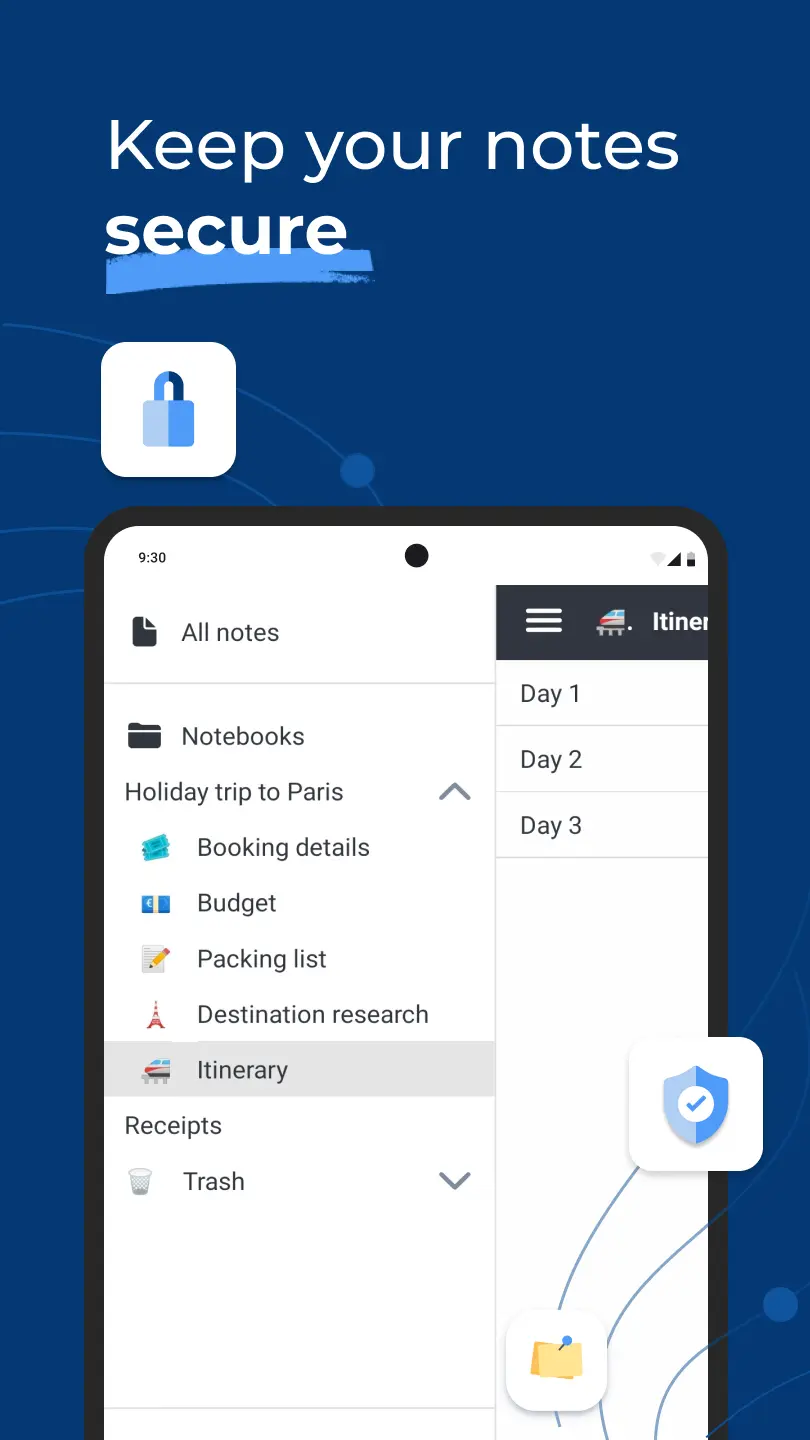
For users, Joplin offers a straightforward and distraction-free experience. Notes are organized into notebooks, with support for tags and basic linking. Its offline-first approach ensures full control over data, which is a key differentiator compared to cloud-dependent apps.
However, Joplin lacks the advanced features found in tools like Notion or Obsidian, particularly in terms of visualization and complex organization.
It is best suited for users who prioritize privacy and simplicity, such as developers or individuals managing personal knowledge without needing advanced structure or collaboration tools.
It is estimated that more then 50% of digital notes are never revisited
A large portion of captured information is not reused due to poor organization or retrieval systems. This reinforces the need for tools that prioritize accessibility and long-term usability.
50%
More then 70% of users say structured note systems improve productivity
Research shows that organizing notes into structured systems significantly enhances efficiency and task management. Tools with databases or linking features contribute most to this improvement.
70%
More then 50% of knowledge workers struggle to organize information effectively
Studies indicate that a majority of professionals collect large amounts of information but lack systems to structure it. This highlights the growing importance of advanced note-taking tools.
50%
Note-Taking and Knowledge Management Trends
Building a System That Fits Your Thinking
Each of these apps represents a different approach to note-taking. Evernote simplifies capture and retrieval, while OneNote offers flexibility for freeform thinking. Obsidian focuses on connecting ideas into a long-term knowledge network, and Notion enables structured systems that scale across projects and workflows. Joplin, on the other hand, emphasizes privacy and control with a straightforward setup.
Choosing between them depends on how information is used: quick capture, structured organization, or deep knowledge building. In many cases, combining tools—such as using one for capture and another for structuring—can create a more effective and adaptable system.
Good To Knows:
• Structure and flexibility are often trade-offs in note-taking apps
• Linking ideas can improve long-term knowledge retention
• Simpler apps are easier to start with but may limit growth
• Database-style tools require setup but scale better over time
• Offline-first apps provide more control over data ownership
How Different Note Systems Shape the Way You Think
• Freeform tools encourage fast capture but less organization
• Structured systems support complex workflows and projects
• Linking-based apps help connect ideas over time
• Database-driven apps enable powerful filtering and retrieval
• Long-term usability depends on consistency and system design
App Comparisons:
Apps 🠛
Ease of Use
Long-Term Use
Feature Depth
Evernote

5/5
4/5
3/5
2/5
1/5
4/5
5/5
3/5
2/5
1/5
5/5
4/5
3/5
2/5
1/5
Microsoft OneNote
5/5
4/5
3/5
2/5
1/5
4/5
5/5
3/5
2/5
1/5
5/5
4/5
3/5
2/5
1/5
Obsidian
5/5
4/5
3/5
2/5
1/5
4/5
5/5
3/5
2/5
1/5
5/5
4/5
3/5
2/5
1/5
Notion

5/5
4/5
3/5
2/5
1/5
4/5
5/5
3/5
2/5
1/5
5/5
4/5
3/5
2/5
1/5
Joplin
5/5
4/5
1/5
Related Science: ⮛
Related Gadgets: ⮛
Did You Get That?
What makes advanced note-taking apps different from basic ones?
Advanced apps go beyond simple text storage by offering structure, linking, or databases. These features help users organize and retrieve information more effectively over time.
Which app is best for long-term knowledge management?
Obsidian and Notion are best suited for long-term use due to their ability to connect and structure information. They support systems that grow alongside the user’s needs.
Is it better to use one app or multiple apps?
Using one app simplifies workflows, but combining apps can improve efficiency. For example, one tool can handle quick capture while another manages structured organization.
Are freeform note-taking apps less effective?
Not necessarily. Freeform apps like OneNote are effective for brainstorming and visual thinking, but they may require additional organization for long-term use.
How important is data ownership in note-taking apps?
For some users, especially those handling sensitive information, data ownership is critical. Apps like Joplin provide more control through local storage and open-source design.




Final Summary
Advanced note-taking is less about the tool itself and more about how information is structured and used over time. Evernote and OneNote provide accessible entry points for capturing and organizing notes, while Obsidian and Notion offer more advanced systems for connecting and structuring knowledge.
Joplin serves a specific role for users who value control and simplicity over features. The key difference between these apps lies in how they balance structure, flexibility, and long-term usability. Selecting the right tool—or combination of tools—can significantly improve how ideas are developed, stored, and retrieved, ultimately supporting more effective thinking and work processes.
Don't Know What to Choose?
Best app for structured workflows and systems: Notion
Provides database-driven organization and customizable layouts for complex use cases.
Best app for building a long-term knowledge network: Obsidian
Uses linking and graph structures to connect ideas over time.
Best app for simple and reliable note capture: Evernote
Offers fast capture and strong search for everyday note-taking.
Share This Post With Others:


