

Joplin
Create notes, organize notebooks, sync across devices, manage tasks, clip web content, and store information locally with encryption support.
A privacy-focused note-taking app designed for users who want ownership and control over their notes and data.
Joplin is an open-source note-taking and productivity application built around local note ownership, offline functionality, and flexible synchronization. The platform allows users to create and organize notes using Markdown while keeping files accessible outside the app rather than locked into proprietary systems.
Unlike many cloud-first note applications, Joplin focuses heavily on privacy and transparency. Notes are stored locally by default, while synchronization can be configured through services like Dropbox, OneDrive, WebDAV, Nextcloud, or Joplin Cloud. The app also supports end-to-end encryption for secure syncing.
Joplin is commonly used for personal note-taking, task management, research collection, journaling, technical documentation, and offline productivity workflows. It is especially popular among users looking for an alternative to ecosystem-locked productivity apps.
The platform combines a relatively lightweight interface with advanced functionality such as web clipping, Markdown editing, attachments, and plugin support. Joplin is available on PC, Mac, Linux, phone, and tablet.
Apps are frequently updated and may change over time. While we aim to keep our reviews accurate and up to date, some information may become outdated or no longer reflect the current version.
Disclaimer ▽ (click open)
How to Use
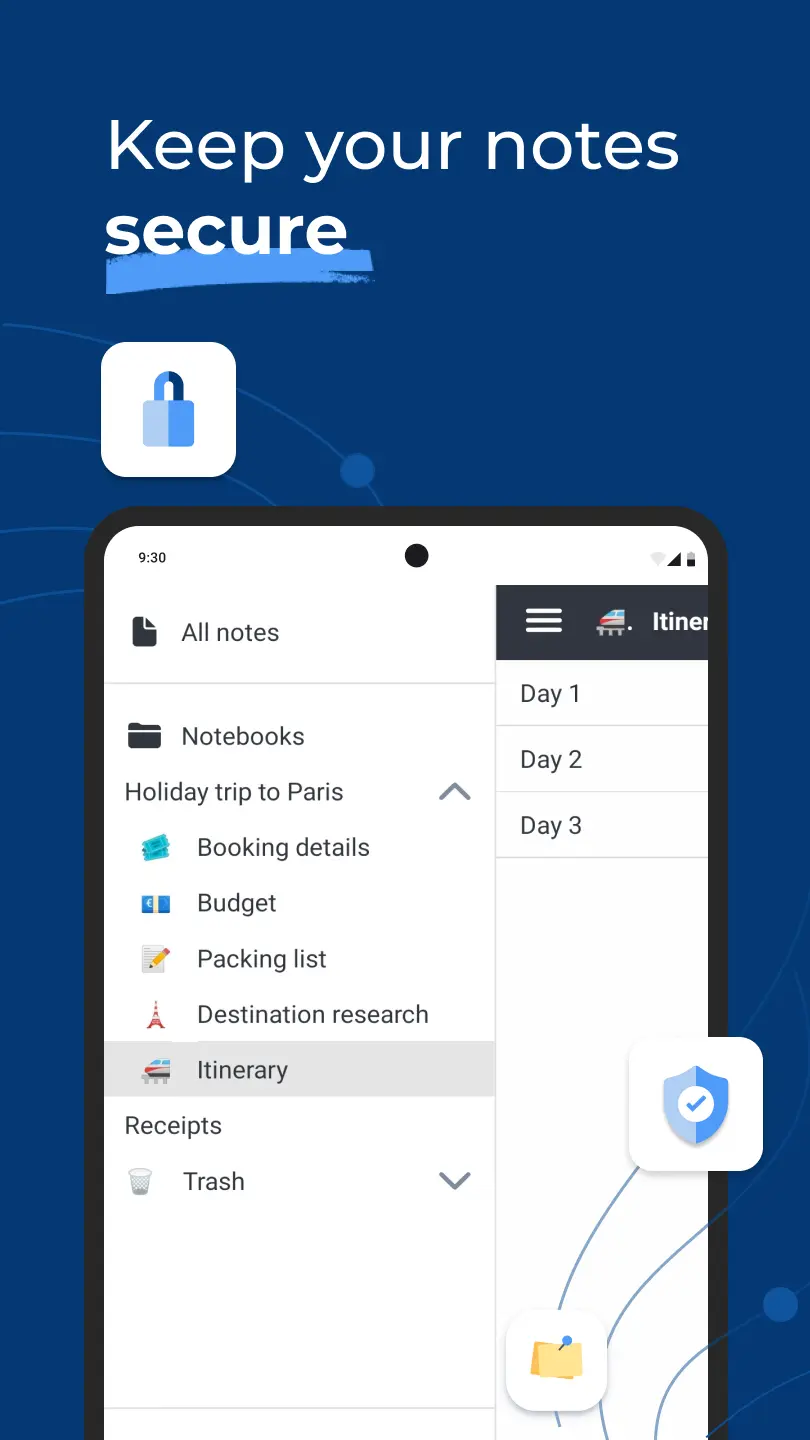
Joplin works by storing notes inside local notebooks that can later be synchronized across devices using cloud services chosen by the user. After installation, users create notebooks and begin writing notes using either a Markdown editor or a rich text editor depending on their preferred workflow.
The app is built around a local-first productivity model. Notes remain stored on the device while optional synchronization copies encrypted versions across connected devices. This approach gives users more control over privacy, storage location, and backups compared to fully cloud-dependent note platforms.
Users can organize information through notebooks, nested folders, tags, and search tools. The app also supports attachments such as PDFs, images, audio files, and documents directly inside notes. One of Joplin’s most practical features is the web clipper extension, which allows users to save webpages, research articles, screenshots, and online references directly into notebooks for offline access later.
Advanced users can expand functionality through plugins that add calendars, kanban systems, enhanced editing tools, and workflow automation. Joplin creates value by combining straightforward note organization with privacy-focused storage and synchronization options that remain largely under the user’s control.
Strongest Points:
✓ Strong privacy and encryption support
✓ Open-source and highly transparent
✓ Flexible sync provider options
✓ Excellent offline functionality
✓ Good Markdown editing experience
Weaker Points:
✕ Interface feels less polished than some competitors
✕ Collaboration features are limited
✕ Mobile app can feel slower with large note libraries
✕ Fewer advanced visual organization tools
✕ Plugin ecosystem smaller than larger productivity platforms


How to Use
Joplin works by storing notes inside local notebooks that can later be synchronized across devices using cloud services chosen by the user. After installation, users create notebooks and begin writing notes using either a Markdown editor or a rich text editor depending on their preferred workflow.
The app is built around a local-first productivity model. Notes remain stored on the device while optional synchronization copies encrypted versions across connected devices. This approach gives users more control over privacy, storage location, and backups compared to fully cloud-dependent note platforms.
Users can organize information through notebooks, nested folders, tags, and search tools. The app also supports attachments such as PDFs, images, audio files, and documents directly inside notes. One of Joplin’s most practical features is the web clipper extension, which allows users to save webpages, research articles, screenshots, and online references directly into notebooks for offline access later.
Advanced users can expand functionality through plugins that add calendars, kanban systems, enhanced editing tools, and workflow automation. Joplin creates value by combining straightforward note organization with privacy-focused storage and synchronization options that remain largely under the user’s control.
Strongest Points:
✓ Strong privacy and encryption support
✓ Open-source and highly transparent
✓ Flexible sync provider options
✓ Excellent offline functionality
✓ Good Markdown editing experience
Weaker Points:
✕ Interface feels less polished than some competitors
✕ Collaboration features are limited
✕ Mobile app can feel slower with large note libraries
✕ Fewer advanced visual organization tools
✕ Plugin ecosystem smaller than larger productivity platforms
Use it For:
🔒 Privacy-focused users wanting more control over their notes and storage
📚 Students and researchers saving articles and reference material offline
💻 Technical users comfortable with Markdown-based workflows
🗂️ Users wanting a lightweight alternative to large cloud productivity ecosystems
🌐 People needing offline note access with flexible syncing options
App Usable on:
Phone
Tablet
PC
TV
Applications and Features
Joplin is designed for users who prioritize data ownership, offline access, and flexible note synchronization. Its core functionality revolves around notebooks, Markdown editing, tagging systems, attachments, and secure syncing.
The app supports both plain text and rich text editing while allowing users to switch between Markdown source editing and formatted previews. This flexibility makes it useful for both technical and non-technical workflows.
One of its most important features is end-to-end encryption, which protects synchronized notes during cloud transfers. Users can also choose where notes sync, including third-party storage providers and self-hosted systems.
Joplin includes a built-in task management system with to-do notes, reminders, and completion tracking. Combined with notebook organization and tagging, this allows users to manage projects and workflows inside the same environment. The platform also supports web clipping, PDF storage, attachments, custom plugins, and offline-first productivity.
Compared to many mainstream note-taking apps, Joplin stands out most in privacy control, open-source transparency, and synchronization flexibility rather than visual design or large-scale collaboration tools.
▽ Gadgets Related to this App ▽
App Summary
Joplin is built for users who want a note-taking platform centered around privacy, local ownership, and flexibility rather than ecosystem lock-in. Instead of forcing users into a single cloud service, the platform allows notes to remain accessible, portable, and synchronized through user-selected providers.
Its biggest strengths are offline reliability, encryption support, Markdown-based organization, and transparent open-source development. This makes the app especially attractive for users handling sensitive information, technical documentation, research material, or long-term personal notes.
The platform works best for users who value control and customization over highly polished design or advanced collaboration tools. While the interface may feel simpler compared to larger commercial competitors, the balance between privacy, flexibility, and offline functionality makes Joplin a strong option in the productivity category. Joplin is available for PC, Mac, Linux, phone, and tablet.
Pricing:
Free
Cheap
Mid
Pricy
High
Free
Cheap
Mid
Pricy
High
Free
Cheap
Mid
Pricy
High
Free
Cheap
Mid
Pricy
High
Free
Cheap
Mid
Pricy
High
Joplin is free and open-source for core note-taking functionality. Optional paid services are mainly related to Joplin Cloud for easier synchronization and collaboration features.
Learning Difficulty:
The core interface is relatively simple, but understanding Markdown formatting, synchronization options, and encryption settings may take some adjustment for new users.
Required Skill Sets:
No technical expertise is required, but users benefit from understanding basic Markdown formatting and file organization concepts.
Educational Content:
▽ Related Apps ▽

Paste stores everything a user copies across Mac, iPhone, and iPad as a searchable visual history, syncs it via private iCloud, and lets users organise frequently reused items into custom Pinboards for instant retrieval.

Organize, track, plan, save, and manage books, movies, games, podcasts, apps, and leisure activities.


1/4
Questions & Answers: ⮛ (click to open)
Does Joplin require a cloud subscription to work?
No. Joplin works fully offline with local storage by default. Cloud syncing is optional and can use multiple third-party providers.
Why do many users prefer Joplin for privacy?
The app supports end-to-end encryption and keeps users in control of where notes are stored and synchronized. Its open-source development also allows greater transparency compared to proprietary platforms.
Can Joplin handle more than simple notes?
Yes. Users can manage tasks, save webpages, store files, organize notebooks, and create structured documentation workflows inside the app.
Is Joplin beginner-friendly?
Basic note-taking is straightforward, but some advanced synchronization and Markdown features may require a short learning period for new users.
Good to Knows: ⮛ (click to open)
• Notes can be synchronized through multiple cloud providers instead of a single locked ecosystem
• Joplin supports end-to-end encryption for secure syncing across devices
• Web clipping tools allow offline saving of webpages and research content
Takeaways: ⮛ (click to open)
• Joplin focuses heavily on privacy and local control of notes
• The platform is especially strong for offline-first workflows
• Open-source development makes the app highly transparent and customizable
Did You Get Any of That?
Related Science Articles:
Explore Other App Solutions With our Blogs
Discover how different apps approach common challenges, what they do well, and where they fall short — helping you understand which tools are best suited for your specific goals and daily routines.
Swipe Less, Talk Better: 5 AI Dating Apps That Might Actually Fix Your Texting
Five AI dating and relationship apps compared — find out which ones build real skills and which ones just write your messages for you.

Gadgifyr Apps
July 30, 2026
-
9 min

The Quiet Ones: 5 Apps Doing Something No One Else Bothered To
Five genuinely inventive apps compared — find out which ones are simply clever and which are actually useful.
Gadgifyr Apps
July 19, 2026
-
9 min

After You Hit "Book": 5 Apps That Make the Trip Itself Better
Five travel apps compared on what they offer before, during, and after the trip — beyond flights, hotels, and bookings.
Gadgifyr Apps
July 14, 2026
-
9 min

Notes That Talk to Each Other: 5 Apps for Thinking, Not Just Typing
Obsidian, Notion, Evernote, OneNote, and Joplin compared — find out which one turns scattered notes into a system that actually connects your ideas.
Gadgifyr Apps
July 11, 2026
-
9 min




Where Curiosity Finds Its Match
Dive into Gadgifyr’s world of honest gadget reviews, scientific clarity, app reviews, and real tools designed to make everyday life smarter and simpler.
Clarity Behind Every Tool
Gadgifyr reviews apps and gadgets through structured analysis and science-backed insight. It focuses on how tools actually work, where they deliver real value, and how they fit into everyday routines.
Each review highlights functionality, usability, and limitations in a clear and practical way. This approach helps users understand which tools are worth using and make informed decisions with confidence.


Why People Trust Gadgifyr App Reviews
Because we go beyond popularity — we uncover new apps, explain how they work, and show what truly adds value. From hidden tools to well-known platforms, we help you understand what fits your needs.


