

Norton 360
Protect devices from malware, secure internet connections, monitor identity risks, back up files, and improve digital privacy across multiple devices.
A broad cybersecurity suite designed for everyday digital protection.
Norton 360 is a cybersecurity and digital privacy platform that combines antivirus protection, secure browsing tools, VPN functionality, identity monitoring, password management, and cloud backup services into a single ecosystem. Rather than focusing on only one type of security, the platform is designed to provide layered protection for daily online activity.
The software works across multiple device types including PCs, smartphones, and tablets, allowing users to manage security from one subscription. Norton 360 continuously monitors for malware, ransomware, phishing attempts, unsafe websites, and suspicious downloads while also adding privacy-focused tools such as encrypted browsing and dark web monitoring.
A major focus of the platform is automation. Many security processes run in the background with minimal user intervention, making the software accessible to non-technical users while still offering more advanced settings for experienced users.
Compared with basic antivirus tools, Norton 360 positions itself as a broader digital safety ecosystem that combines device security, privacy management, and identity protection services.
Apps are frequently updated and may change over time. While we aim to keep our reviews accurate and up to date, some information may become outdated or no longer reflect the current version.
Disclaimer ▽ (click open)
How to Use
Using Norton 360 starts with creating an account and installing the software on supported devices such as Windows PCs, Macs, Android phones, or iPhones. Once installed, the platform performs an initial system scan to identify malware, outdated software, security vulnerabilities, or unsafe settings.
The software operates primarily through continuous real-time monitoring. Norton scans downloads, applications, websites, email attachments, and system behavior for suspicious activity. If threats are detected, users receive alerts with recommended actions or automatic threat removal.
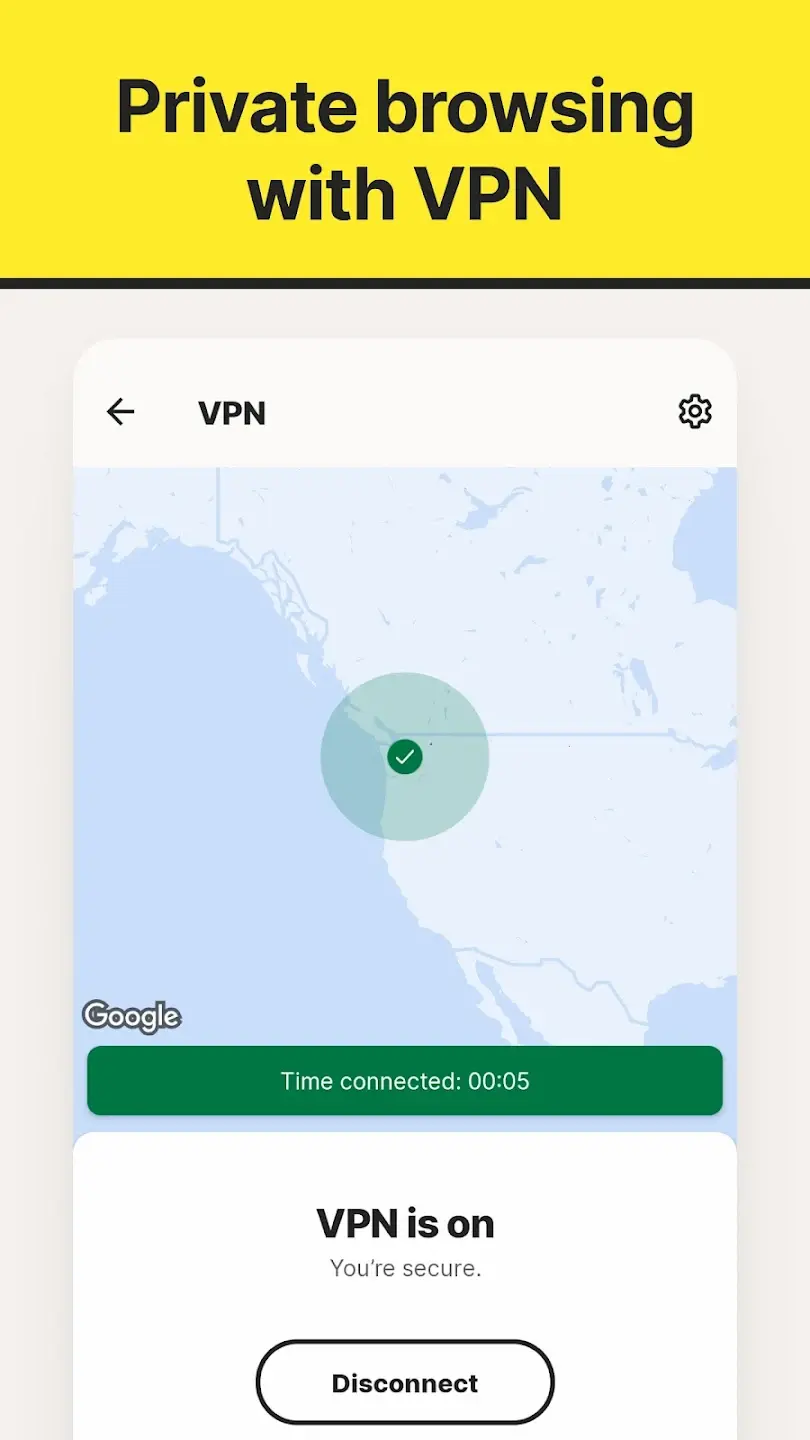
One of the platform’s central components is the integrated Secure VPN, which encrypts internet traffic and helps improve privacy when using public Wi-Fi networks. Users can enable or disable the VPN directly from the dashboard depending on browsing needs.
Norton 360 also includes Password Manager, cloud backup tools for PCs, and identity-focused features such as dark web monitoring and breach alerts. These tools are intended to centralize multiple security needs into one interface rather than requiring separate apps.
The dashboard is organized around security categories including device protection, privacy, identity, and performance optimization. Most daily interactions involve checking security status, running occasional scans, reviewing alerts, or adjusting privacy settings.
Higher subscription tiers add more advanced features such as parental controls, identity theft support, and increased cloud storage capacity.
Strongest Points:
✓ Comprehensive all-in-one security suite
✓ Strong malware and phishing protection
✓ Integrated VPN and password manager
✓ Multi-device compatibility
✓ Automated real-time monitoring
Weaker Points:
✕ Higher pricing than many standalone antivirus apps
✕ Some features locked behind premium tiers
✕ Can use noticeable system resources during scans
✕ Interface may feel crowded for some users
✕ Frequent upgrade and feature promotion notifications



How to Use
Using Norton 360 starts with creating an account and installing the software on supported devices such as Windows PCs, Macs, Android phones, or iPhones. Once installed, the platform performs an initial system scan to identify malware, outdated software, security vulnerabilities, or unsafe settings.
The software operates primarily through continuous real-time monitoring. Norton scans downloads, applications, websites, email attachments, and system behavior for suspicious activity. If threats are detected, users receive alerts with recommended actions or automatic threat removal.
One of the platform’s central components is the integrated Secure VPN, which encrypts internet traffic and helps improve privacy when using public Wi-Fi networks. Users can enable or disable the VPN directly from the dashboard depending on browsing needs.
Norton 360 also includes Password Manager, cloud backup tools for PCs, and identity-focused features such as dark web monitoring and breach alerts. These tools are intended to centralize multiple security needs into one interface rather than requiring separate apps.
The dashboard is organized around security categories including device protection, privacy, identity, and performance optimization. Most daily interactions involve checking security status, running occasional scans, reviewing alerts, or adjusting privacy settings.
Higher subscription tiers add more advanced features such as parental controls, identity theft support, and increased cloud storage capacity.
Strongest Points:
✓ Comprehensive all-in-one security suite
✓ Strong malware and phishing protection
✓ Integrated VPN and password manager
✓ Multi-device compatibility
✓ Automated real-time monitoring
Weaker Points:
✕ Higher pricing than many standalone antivirus apps
✕ Some features locked behind premium tiers
✕ Can use noticeable system resources during scans
✕ Interface may feel crowded for some users
✕ Frequent upgrade and feature promotion notifications
Use it For:
🛡️ Users wanting an all-in-one cybersecurity solution
💻 Households managing security across multiple devices
🌐 People frequently using public Wi-Fi networks
🔐 Users needing password management and privacy tools together
👨👩👧 Families interested in parental controls and identity monitoring
App Usable on:
Phone
Tablet
PC
TV
Applications and Features
Norton 360 combines several cybersecurity categories into one integrated platform. Its core security engine provides real-time antivirus and anti-malware protection, monitoring files, downloads, applications, and online activity for suspicious behavior.
A major feature is the built-in Secure VPN, which encrypts internet traffic and helps reduce exposure on public or unsecured networks. This is particularly useful for remote work, travel, and general browsing privacy.
The platform also includes Dark Web Monitoring, where supported regions allow Norton to track whether user information appears in known breach databases or illicit marketplaces. Users receive alerts if monitored information is detected.
Another important component is Cloud Backup for Windows PCs. This allows users to back up sensitive files and reduce risks associated with ransomware or hardware failure. The software additionally provides tools such as password management, scam protection, parental controls, app security monitoring, and device optimization features depending on the plan selected.
Compared with lightweight antivirus apps, Norton 360 focuses on offering a broader digital protection ecosystem rather than only malware detection. This makes the platform particularly attractive for users wanting centralized security management across multiple devices and services.
▽ Gadgets Related to this App ▽
App Summary
Norton 360 is a broad cybersecurity platform designed to combine antivirus protection, privacy tools, identity monitoring, and cloud-based security services into one centralized system. Its strongest advantage lies in reducing the need for multiple separate security applications by integrating several protective layers into a single subscription.
The platform works especially well for users looking for a comprehensive security environment across PCs, smartphones, and tablets. Features such as real-time malware protection, VPN access, dark web monitoring, and password management create a wider security ecosystem than standard antivirus software alone.
While the software can feel more feature-heavy and expensive than simpler alternatives, it provides strong value for users wanting centralized digital protection and multi-device coverage. Households and non-technical users may particularly benefit from the automated nature of the platform.
Available for PC, Mac, smartphones, and tablets, with browser-based account management support.
Pricing:
Free
Cheap
Mid
Pricy
High
Free
Cheap
Mid
Pricy
High
Free
Cheap
Mid
Pricy
High
Free
Cheap
Mid
Pricy
High
Free
Cheap
Mid
Pricy
High
Norton 360 uses a subscription-based pricing structure with several feature tiers and device coverage options. While the platform is more expensive than basic antivirus apps, the pricing reflects the inclusion of VPN services, identity tools, backup storage, and multi-device support.
Learning Difficulty:
Most core protection systems are automated and designed for non-technical users. The large number of features can require some exploration, but the interface remains relatively guided.
Required Skill Sets:
Basic understanding of online safety and device management is enough for most users to operate the platform effectively.
Educational Content:
▽ Related Apps ▽

Widgetsmith lets users design custom widgets by choosing a type, size, and style, then place them on the home screen, lock screen, or Control Center with full control over fonts, colors, and themes.

ProtonVPN encrypts internet traffic and masks a user’s IP address through a global server network, with a free unlimited tier and a premium suite offering advanced privacy tools including Secure Core routing, Stealth protocol, and Tor over VPN.

Surfshark encrypts internet traffic and hides a user's IP address across unlimited devices simultaneously, enabling private browsing, streaming access, and secure connections on any network.

1/4
Questions & Answers: ⮛ (click to open)
Does Norton 360 include a VPN service?
Yes. Most Norton 360 plans include Secure VPN functionality integrated into the platform. Users can activate encrypted browsing directly from the dashboard.
Can Norton 360 protect against ransomware?
The software includes ransomware protection through real-time threat detection, malicious behavior monitoring, and cloud backup features on supported devices.
Is Norton 360 suitable for multiple devices?
Yes. Many subscription plans are specifically designed for households or users with several devices. Coverage can include PCs, Macs, Android devices, and iPhones depending on the plan.
Does Norton 360 replace all cybersecurity tools?
It replaces many common security tools by combining antivirus, VPN, password management, and privacy features together. However, some advanced users may still prefer specialized standalone tools for certain tasks.
Good to Knows: ⮛ (click to open)
• Some advanced identity protection features vary by region
• Windows users receive the broadest feature set and backup tools
• VPN functionality is integrated directly into the main dashboard
Takeaways: ⮛ (click to open)
• Norton 360 combines antivirus, VPN, privacy, and identity tools in one platform
• The software focuses heavily on automated real-time protection
• Its biggest strength is centralized multi-device security management
Did You Get Any of That?
Related Science Articles:
Explore Other App Solutions With our Blogs
Discover how different apps approach common challenges, what they do well, and where they fall short — helping you understand which tools are best suited for your specific goals and daily routines.
Swipe Less, Talk Better: 5 AI Dating Apps That Might Actually Fix Your Texting
Five AI dating and relationship apps compared — find out which ones build real skills and which ones just write your messages for you.

Gadgifyr Apps
July 30, 2026
-
9 min

The Quiet Ones: 5 Apps Doing Something No One Else Bothered To
Five genuinely inventive apps compared — find out which ones are simply clever and which are actually useful.
Gadgifyr Apps
July 19, 2026
-
9 min

After You Hit "Book": 5 Apps That Make the Trip Itself Better
Five travel apps compared on what they offer before, during, and after the trip — beyond flights, hotels, and bookings.
Gadgifyr Apps
July 14, 2026
-
9 min

Notes That Talk to Each Other: 5 Apps for Thinking, Not Just Typing
Obsidian, Notion, Evernote, OneNote, and Joplin compared — find out which one turns scattered notes into a system that actually connects your ideas.
Gadgifyr Apps
July 11, 2026
-
9 min




Where Curiosity Finds Its Match
Dive into Gadgifyr’s world of honest gadget reviews, scientific clarity, app reviews, and real tools designed to make everyday life smarter and simpler.
Clarity Behind Every Tool
Gadgifyr reviews apps and gadgets through structured analysis and science-backed insight. It focuses on how tools actually work, where they deliver real value, and how they fit into everyday routines.
Each review highlights functionality, usability, and limitations in a clear and practical way. This approach helps users understand which tools are worth using and make informed decisions with confidence.


Why People Trust Gadgifyr App Reviews
Because we go beyond popularity — we uncover new apps, explain how they work, and show what truly adds value. From hidden tools to well-known platforms, we help you understand what fits your needs.


