

Resume Builder
Resume Builder lets users create, edit, and export professional resumes and cover letters on iPhone using customizable templates, AI writing assistance, and LinkedIn import, with PDF export ready for job applications.
A job-ready resume on your iPhone in minutes — no desktop, no design skills, no blank page.
Resume Builder is a mobile resume and CV creation app designed specifically for iPhone, allowing users to build and export professional job application documents entirely from their phone. It removes the need for a desktop, design software, or a blank document — users fill in structured sections and the app handles layout, formatting, and export automatically.
The app offers over 20 professionally designed templates with 10 colour options each, producing 200+ unique combinations. An integrated AI writing assistant suggests phrasing for job titles, summaries, and experience descriptions, helping users fill sections with professional-sounding language even when writing about their own background is difficult. LinkedIn profile data can be imported directly, skipping manual entry entirely for users whose work history is already up to date on the platform.
Once complete, resumes are exported as professional PDFs and can be shared directly from the app via email, saved to Files, or attached to job applications. Multiple resume profiles can be created and saved within the app, allowing users to tailor different versions for different roles.
Apps are frequently updated and may change over time. While we aim to keep our reviews accurate and up to date, some information may become outdated or no longer reflect the current version.
Disclaimer ▽ (click open)
How to Use
Getting started with Resume Builder is immediate. After opening the app, users choose whether to start from scratch, import from LinkedIn, or upload an existing resume. Selecting Import from LinkedIn pulls in work history, education, and skills automatically, saving most of the manual data entry for users whose profile is current.
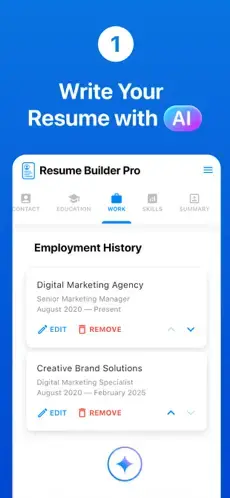
The main editing interface presents the resume as a series of structured sections — personal information, work experience, education, skills, languages, certifications, and a personal summary. Each section is edited through a clean input form on screen. The AI assistant is accessible within each section and can suggest professional-sounding bullet points and descriptions based on the job title or role entered, useful for users who struggle to articulate their own experience compellingly.
Templates are selected and previewed from a gallery view. Each template supports colour customisation across 10 palette options, and fonts, text sizes, and section spacing can be adjusted. A live preview updates as edits are made, showing exactly how the final document will appear when printed or viewed as a PDF.
Once finished, the resume is exported with a single tap as a PDF file, which can be shared directly to email, saved to iPhone’s Files app, or sent through any messaging or sharing app on the device. Cover letter creation is also available using the same template system, allowing a matched pair of documents to be produced for the same application.
Strongest Points:
✓ Entirely mobile — the complete resume creation and export process works on iPhone without any desktop required at any stage
✓ LinkedIn import skips manual data entry for users with an up-to-date profile, allowing a complete first draft to be ready in under two minutes
✓ 200+ template and colour combinations give meaningful design variety while keeping all outputs looking professional and print-ready
✓ AI writing assistant helps users who struggle to describe their own experience generate polished, professional-sounding bullet points and summaries
✓ Multiple resume profiles can be saved and managed in-app, making it practical to maintain tailored versions for different job types or industries
Weaker Points:
✕ Typing out detailed work experience on a small phone screen is inherently slower and more error-prone than working on a desktop keyboard
✕ Template variety, while decent, is narrower than web-based resume builders that offer 40+ or 100+ design options across more categories
✕ ATS optimisation guidance is limited — the app does not specifically scan resumes for keyword gaps or provide detailed compatibility feedback for applicant tracking systems
✕ Some premium features require an in-app subscription, and the pricing structure can be unclear for first-time users expecting a fully free experience
✕ Export is PDF-only, with no Word document or editable format option for users who need to submit in DOCX or make post-export edits in a word processor


How to Use
Getting started with Resume Builder is immediate. After opening the app, users choose whether to start from scratch, import from LinkedIn, or upload an existing resume. Selecting Import from LinkedIn pulls in work history, education, and skills automatically, saving most of the manual data entry for users whose profile is current.
The main editing interface presents the resume as a series of structured sections — personal information, work experience, education, skills, languages, certifications, and a personal summary. Each section is edited through a clean input form on screen. The AI assistant is accessible within each section and can suggest professional-sounding bullet points and descriptions based on the job title or role entered, useful for users who struggle to articulate their own experience compellingly.
Templates are selected and previewed from a gallery view. Each template supports colour customisation across 10 palette options, and fonts, text sizes, and section spacing can be adjusted. A live preview updates as edits are made, showing exactly how the final document will appear when printed or viewed as a PDF.
Once finished, the resume is exported with a single tap as a PDF file, which can be shared directly to email, saved to iPhone’s Files app, or sent through any messaging or sharing app on the device. Cover letter creation is also available using the same template system, allowing a matched pair of documents to be produced for the same application.
Strongest Points:
✓ Entirely mobile — the complete resume creation and export process works on iPhone without any desktop required at any stage
✓ LinkedIn import skips manual data entry for users with an up-to-date profile, allowing a complete first draft to be ready in under two minutes
✓ 200+ template and colour combinations give meaningful design variety while keeping all outputs looking professional and print-ready
✓ AI writing assistant helps users who struggle to describe their own experience generate polished, professional-sounding bullet points and summaries
✓ Multiple resume profiles can be saved and managed in-app, making it practical to maintain tailored versions for different job types or industries
Weaker Points:
✕ Typing out detailed work experience on a small phone screen is inherently slower and more error-prone than working on a desktop keyboard
✕ Template variety, while decent, is narrower than web-based resume builders that offer 40+ or 100+ design options across more categories
✕ ATS optimisation guidance is limited — the app does not specifically scan resumes for keyword gaps or provide detailed compatibility feedback for applicant tracking systems
✕ Some premium features require an in-app subscription, and the pricing structure can be unclear for first-time users expecting a fully free experience
✕ Export is PDF-only, with no Word document or editable format option for users who need to submit in DOCX or make post-export edits in a word processor
Use it For:
📱 Job seekers who want to create or update a resume quickly on their iPhone without needing access to a computer
🔗 LinkedIn users with complete, up-to-date profiles who want to convert their professional history into a formatted resume in seconds via direct import
🎓 Students and recent graduates creating their first formal resume who need AI-assisted guidance on how to describe their limited experience professionally
💼 Professionals who need to update their resume on the go between interviews or while commuting, without carrying a laptop
🎨 Users who want a polished, visually well-designed document without any graphic design knowledge or access to design software
App Usable on:
Phone
Tablet
PC
TV
Applications and Features
Resume Builder’s template system supports over 20 base designs across professional, modern, and clean styles, each available in 10 colour palettes. Users can adjust fonts, sizes, text alignment, and section spacing within any template. A live preview shows the formatted output in real time as sections are edited, eliminating the need to export a test version to check appearance.
The AI writing assistant is embedded throughout the editing interface. It generates professionally worded content suggestions for job summaries, experience bullet points, and skills descriptions based on the role title and industry entered. Pre-written content snippets are also available for common roles, allowing users to select and adapt relevant bullet points rather than writing from scratch.
LinkedIn import pulls in profile data with a few taps, populating the work experience, education, and skills sections automatically. The built-in skills list lets users browse and add relevant skills by category without typing each one individually. Custom sections can be added beyond the standard template layout for portfolios, publications, volunteer work, or other non-standard content.
Completed resumes export as PDFs directly from the app and can be shared instantly via email, saved to the Files app, or forwarded to any sharing destination on the iPhone. Cover letter creation is also available using the same template and colour scheme, producing a visually matched pair of documents. Multiple resume profiles are stored within the app for easy switching between tailored versions for different job types.
▽ Gadgets Related to this App ▽
App Summary
Resume Builder solves a specific and practical problem: the need to produce a professional-looking resume from a phone, quickly and without design expertise. For users who need to apply for a job while away from a computer, update their CV during a commute, or create a first resume without access to Word or a laptop, it delivers exactly what it promises.
The LinkedIn import and AI writing features are the two most practically useful aspects of the app. Together they reduce the time from opening the app to having a shareable PDF to a matter of minutes for users who already have their work history documented online. The template variety is sufficient for most professional contexts, and the colour customisation gives enough flexibility to avoid all resumes looking identical.
The limitations are inherent to the mobile format rather than specific to this app: typing detailed experience on a phone is slower than on a keyboard, and PDF-only export limits flexibility for roles that request DOCX submissions. For the core use case of creating a clean, professional resume on an iPhone, it is a reliable and well-rated tool.
Pricing:
Free
Cheap
Mid
Pricy
High
Free
Cheap
Mid
Pricy
High
Free
Cheap
Mid
Pricy
High
Free
Cheap
Mid
Pricy
High
Free
Cheap
Mid
Pricy
High
Resume Builder is free to download with core features available at no cost, including basic template access, data entry, and PDF export. Premium features such as additional templates, advanced AI writing tools, and cover letter creation are available through in-app purchases, with subscription pricing typically ranging from a few dollars per month to an affordable one-time unlock. Pricing is displayed at the point of upgrade within the app.
Learning Difficulty:
The app guides users through resume creation section by section with a simple form-based interface that requires no prior knowledge of formatting, design, or resume structure to produce a professional result.
Required Skill Sets:
Educational Content:
▽ Related Apps ▽

Widgetsmith lets users design custom widgets by choosing a type, size, and style, then place them on the home screen, lock screen, or Control Center with full control over fonts, colors, and themes.

ProtonVPN encrypts internet traffic and masks a user’s IP address through a global server network, with a free unlimited tier and a premium suite offering advanced privacy tools including Secure Core routing, Stealth protocol, and Tor over VPN.

Surfshark encrypts internet traffic and hides a user's IP address across unlimited devices simultaneously, enabling private browsing, streaming access, and secure connections on any network.

1/4
Questions & Answers: ⮛ (click to open)
Can a complete, professional resume really be built on an iPhone?
Yes. Resume Builder handles all layout, formatting, and export on the device without any desktop involvement. For users with a LinkedIn profile to import from, a polished PDF resume can be ready to send within a few minutes. For users entering everything manually, the process takes longer but the end result is the same clean, print-ready document.
How does the LinkedIn import work?
The app pulls data directly from a LinkedIn profile with a few taps, populating work experience, education, and skills sections automatically. Users are then able to edit each imported section within the app before finalising the resume. The import works best when the LinkedIn profile is detailed and current.
Can the resume be edited after exporting as a PDF?
The exported PDF itself cannot be edited, but the source resume in the app remains editable at any time. Users can make changes within the app and re-export a new PDF as many times as needed. If a fully editable DOCX format is required, a PDF-to-Word conversion tool would need to be used separately after exporting.
Is the app suitable for people applying for their first job with no experience?
Yes. The AI writing assistant and built-in pre-written content suggestions are specifically helpful for users who have limited experience to describe. The app can generate professional-sounding summaries and bullet points for entry-level positions, internships, and student roles, making the blank section less daunting for first-time applicants.
Good to Knows: ⮛ (click to open)
• The LinkedIn import feature works best when the LinkedIn profile is complete and up to date — gaps or sparse sections will carry over directly into the resume, requiring manual additions afterwards.
• Creating a duplicate of an existing resume profile is a quick way to produce a tailored version for a specific application — users can keep the original intact and adjust the duplicate for each new role.
• Most hiring platforms and Applicant Tracking Systems accept PDF submissions, but if a specific employer requests a DOCX file, a PDF-to-Word converter tool will be needed as an additional step after exporting from the app.
Takeaways: ⮛ (click to open)
• Resume Builder is the most practical option for anyone who needs to create or update a professional resume entirely on an iPhone — the LinkedIn import and AI writing tools make the process fast enough to be genuinely useful on a mobile screen.
• The template and colour system produces visually clean, professional documents without any design input from the user, which is the core value the app delivers.
• For detailed, heavily tailored applications or roles requiring DOCX submissions, a web-based resume builder on a desktop will offer more flexibility and a faster typing experience.
Did You Get Any of That?
Related Science Articles:
Explore Other App Solutions With our Blogs
Discover how different apps approach common challenges, what they do well, and where they fall short — helping you understand which tools are best suited for your specific goals and daily routines.
Swipe Less, Talk Better: 5 AI Dating Apps That Might Actually Fix Your Texting
Five AI dating and relationship apps compared — find out which ones build real skills and which ones just write your messages for you.

Gadgifyr Apps
July 30, 2026
-
9 min

The Quiet Ones: 5 Apps Doing Something No One Else Bothered To
Five genuinely inventive apps compared — find out which ones are simply clever and which are actually useful.
Gadgifyr Apps
July 19, 2026
-
9 min

After You Hit "Book": 5 Apps That Make the Trip Itself Better
Five travel apps compared on what they offer before, during, and after the trip — beyond flights, hotels, and bookings.
Gadgifyr Apps
July 14, 2026
-
9 min

Notes That Talk to Each Other: 5 Apps for Thinking, Not Just Typing
Obsidian, Notion, Evernote, OneNote, and Joplin compared — find out which one turns scattered notes into a system that actually connects your ideas.
Gadgifyr Apps
July 11, 2026
-
9 min




Where Curiosity Finds Its Match
Dive into Gadgifyr’s world of honest gadget reviews, scientific clarity, app reviews, and real tools designed to make everyday life smarter and simpler.
Clarity Behind Every Tool
Gadgifyr reviews apps and gadgets through structured analysis and science-backed insight. It focuses on how tools actually work, where they deliver real value, and how they fit into everyday routines.
Each review highlights functionality, usability, and limitations in a clear and practical way. This approach helps users understand which tools are worth using and make informed decisions with confidence.


Why People Trust Gadgifyr App Reviews
Because we go beyond popularity — we uncover new apps, explain how they work, and show what truly adds value. From hidden tools to well-known platforms, we help you understand what fits your needs.


