

A productivity-focused bookmark system built around fast organization and retrieval.
Anybox is a bookmarking and knowledge organization app for Apple devices that helps users collect, categorize, and quickly retrieve online content. Instead of relying on traditional browser bookmarks, the app creates a centralized system where links, notes, files, images, and archived webpages can all be stored together in a more structured way.
The app is mainly focused on improving how users manage information overload. Rather than simply saving links into folders, Anybox uses tags, smart lists, metadata, quick search systems, and automation tools to make saved content easier to find later. It is especially targeted toward productivity-focused users, researchers, students, writers, and people who frequently collect online resources.
A major part of the app’s appeal is its deep integration with the Apple ecosystem. Features such as iCloud sync, Spotlight integration, widgets, shortcuts, floating bookmark docks, and native share menus are designed to make saving and retrieving information feel faster and more natural on macOS, iPhone, and iPad.
Apps are frequently updated and may change over time. While we aim to keep our reviews accurate and up to date, some information may become outdated or no longer reflect the current version.
Disclaimer ▽ (click open)
How to Use
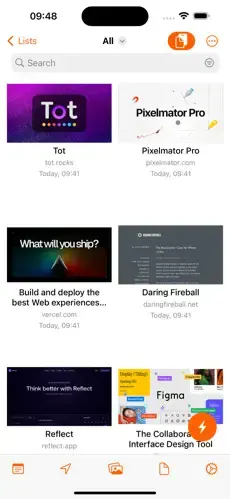
Anybox works as a centralized digital storage and retrieval system for web content. Users save links directly from browsers, apps, or share menus into the app, where the content is automatically organized with metadata such as titles, URLs, tags, previews, dates, and categories. Instead of manually managing large bookmark folders, users can create flexible structures using nested tags, folders, and Smart Lists.
The app tries to solve a common productivity problem: saving information is easy, but finding it later is difficult. To address this, Anybox emphasizes fast retrieval systems. Users can search bookmarks through Quick Find, Spotlight integration, keyboard shortcuts, and floating bookmark bars like Anydock. This allows saved resources to behave more like searchable knowledge assets rather than static bookmarks.
Another important aspect is content preservation. Anybox can archive webpages as PDFs, screenshots, or web archives so users can retain information even if websites later change or disappear. The app also supports images, files, notes, and deep links, making it useful beyond standard web bookmarking.
The experience is heavily integrated into Apple workflows. iCloud synchronization keeps collections updated across Mac, iPhone, and iPad devices, while automation support through Siri Shortcuts and AppleScript allows users to build custom workflows for research, productivity, and information management.
Strongest Points:
✓ Excellent organization and tagging system
✓ Fast search and bookmark retrieval tools
✓ Deep integration with Apple ecosystem
✓ Supports links, files, images, and notes
✓ Strong automation and workflow capabilities
Weaker Points:
✕ Only available for Apple platforms
✕ Can feel advanced for casual users
✕ Some sync complaints from users
✕ No collaborative team features
✕ Free version has storage limitations



How to Use
Anybox works as a centralized digital storage and retrieval system for web content. Users save links directly from browsers, apps, or share menus into the app, where the content is automatically organized with metadata such as titles, URLs, tags, previews, dates, and categories. Instead of manually managing large bookmark folders, users can create flexible structures using nested tags, folders, and Smart Lists.
The app tries to solve a common productivity problem: saving information is easy, but finding it later is difficult. To address this, Anybox emphasizes fast retrieval systems. Users can search bookmarks through Quick Find, Spotlight integration, keyboard shortcuts, and floating bookmark bars like Anydock. This allows saved resources to behave more like searchable knowledge assets rather than static bookmarks.
Another important aspect is content preservation. Anybox can archive webpages as PDFs, screenshots, or web archives so users can retain information even if websites later change or disappear. The app also supports images, files, notes, and deep links, making it useful beyond standard web bookmarking.
The experience is heavily integrated into Apple workflows. iCloud synchronization keeps collections updated across Mac, iPhone, and iPad devices, while automation support through Siri Shortcuts and AppleScript allows users to build custom workflows for research, productivity, and information management.
Strongest Points:
✓ Excellent organization and tagging system
✓ Fast search and bookmark retrieval tools
✓ Deep integration with Apple ecosystem
✓ Supports links, files, images, and notes
✓ Strong automation and workflow capabilities
Weaker Points:
✕ Only available for Apple platforms
✕ Can feel advanced for casual users
✕ Some sync complaints from users
✕ No collaborative team features
✕ Free version has storage limitations
Use it For:
🍎 Apple users wanting a native bookmark management system
📚 Researchers and students collecting large amounts of online material
🧠 Productivity-focused users building personal knowledge libraries
✍️ Writers and creators organizing references and inspiration
⚡ Users wanting faster access to frequently used resources
App Usable on:
Phone
Tablet
PC
TV
Applications and Features
Anybox is designed for users who regularly collect information online and need a more advanced system than browser bookmarks. The app combines bookmarking, read-later functionality, lightweight archiving, and knowledge management into a single workspace.
One of the app’s most important features is its organizational flexibility. Users can combine folders, nested tags, Smart Lists, filters, and metadata rules to automatically structure content. This allows large collections of saved material to remain searchable and manageable over time.
The app also focuses heavily on speed and accessibility. Quick Find search, Spotlight support, keyboard shortcuts, widgets, floating bookmark bars, and browser extensions reduce the friction involved in saving and reopening content. Instead of navigating through browser folders, users can instantly search and launch resources from anywhere in macOS or iOS.
Another standout capability is webpage preservation. Users can archive content as PDFs, screenshots, or web archives to create more permanent references. This is especially useful for research, documentation, and long-term information storage.
Compared to traditional bookmarking systems, Anybox behaves more like a lightweight personal knowledge management tool optimized specifically for Apple users.
▽ Gadgets Related to this App ▽
App Summary
Anybox is built for users who want more structure, speed, and flexibility than traditional browser bookmarks provide. Rather than acting as a simple link saver, the app tries to create a searchable and organized digital resource system where webpages, notes, files, and references can all be managed together.
Its strongest value comes from how it approaches information retrieval. Features such as Smart Lists, Quick Find, nested tags, Spotlight integration, automation support, and webpage archiving are designed to help users not only save information, but actually reuse it efficiently later. This makes the app particularly useful for research-heavy workflows, content organization, and productivity systems.
At the same time, the app is clearly designed for Apple-focused environments and may feel overly advanced for users who only save occasional bookmarks. For people deeply invested in macOS, iPhone, and iPad workflows, however, Anybox offers one of the more sophisticated native bookmarking and digital organization experiences currently available.
Pricing:
Free
Cheap
Mid
Pricy
High
Free
Cheap
Mid
Pricy
High
Free
Cheap
Mid
Pricy
High
Free
Cheap
Mid
Pricy
High
Free
Cheap
Mid
Pricy
High
Anybox offers a free version with limited bookmark capacity and feature restrictions. Paid plans include subscription options and a lifetime purchase that unlocks unlimited storage, synchronization, and advanced organizational tools across Apple devices.
Learning Difficulty:
Basic bookmarking is simple, but the deeper organization systems, automation features, Smart Lists, and workflow integrations require some learning to fully benefit from the app.
Required Skill Sets:
Users benefit from basic digital organization habits and an understanding of tagging, folders, or workflow systems to fully use the app’s advanced capabilities.
Educational Content:
▽ Related Apps ▽

Create notes, connect ideas with links, organize knowledge visually, store files locally, customize workflows, and build long-term information systems.

Create notes, organize notebooks, draw by hand, store files, sync content, collaborate with others, and manage information across devices.

Encourage focus by blocking distractions, tracking sessions, and growing virtual trees based on productivity.

1/4
Questions & Answers: ⮛ (click to open)
How is Anybox different from normal browser bookmarks?
Traditional browser bookmarks mainly store links in folders, while Anybox builds a searchable and organized knowledge system around saved content. It adds metadata, tags, Smart Lists, archiving, quick search, and automation capabilities that improve long-term retrieval and workflow integration.
Can Anybox work as a read-later app?
Yes. Users can save articles and webpages for later reading while organizing them into collections, tags, or Smart Lists. Archived versions also help preserve content even if webpages later change or disappear.
Why do productivity users often prefer Anybox?
Many users value the speed of retrieval tools such as Quick Find, Spotlight integration, floating bookmark bars, and keyboard shortcuts. These systems reduce the time needed to locate saved resources during work sessions.
Does Anybox support cross-platform syncing?
The app synchronizes across Apple devices using iCloud. However, there are currently no official Android or Windows versions, making the experience primarily centered around the Apple ecosystem.
Good to Knows: ⮛ (click to open)
• Supports webpage archiving as PDF, screenshot, or web archive
• Includes automation support through Siri Shortcuts and AppleScript
• Browser extensions are available for Safari, Chrome, and Firefox
Takeaways: ⮛ (click to open)
• Anybox focuses on long-term organization and retrieval rather than simple bookmarking
• The app is strongest inside Apple ecosystem workflows
• Its advanced search and tagging systems differentiate it from standard browser bookmark managers
Did You Get Any of That?
Related Science Articles:
Explore Other App Solutions With our Blogs
Discover how different apps approach common challenges, what they do well, and where they fall short — helping you understand which tools are best suited for your specific goals and daily routines.
5 Skincare Apps, One Question: Will You Still Be Using It in 30 Days?
Five skincare apps compared on ingredient safety, routine building, and skin progress tracking — find out which one fits how you actually use skincare.

Gadgifyr Apps
July 23, 2026
-
9 min

Read More, Forget Less: 5 Apps Built for Retention, Not Just Bookmarks
Kindle, Audible, Libby, Scribd, and Moon+ Reader compared — find out which one fits your reading habits and helps the content stick.
Gadgifyr Apps
July 8, 2026
-
9 min

Best Focus and Productivity Apps Compared
Forest, TickTick, Todoist, Trello, and Notion compared — find out which one builds real focus habits rather than adding another tool to ignore.
Gadgifyr Apps
July 5, 2026
-
9 min

Cutting Through the Noise: 5 Market Sources Worth Your Actual Attention
Bloomberg, Seeking Alpha, Investing.com, Yahoo Finance, and Finimize — compared on what they actually deliver to different types of investors.
Gadgifyr Apps
July 2, 2026
-
9 min




Where Curiosity Finds Its Match
Dive into Gadgifyr’s world of honest gadget reviews, scientific clarity, app reviews, and real tools designed to make everyday life smarter and simpler.
Clarity Behind Every Tool
Gadgifyr reviews apps and gadgets through structured analysis and science-backed insight. It focuses on how tools actually work, where they deliver real value, and how they fit into everyday routines.
Each review highlights functionality, usability, and limitations in a clear and practical way. This approach helps users understand which tools are worth using and make informed decisions with confidence.


Why People Trust Gadgifyr App Reviews
Because we go beyond popularity — we uncover new apps, explain how they work, and show what truly adds value. From hidden tools to well-known platforms, we help you understand what fits your needs.


