

Home Assistant
Home Assistant lets users automate, monitor, and control all smart home devices from a single interface without relying on external cloud services.
One platform to run your entire home — without giving up your data.
Home Assistant is an open-source smart home platform built around a simple idea: your home data should stay in your home. Developed by the Open Home Foundation and maintained by one of the largest open-source communities in the world, it runs locally on dedicated hardware — such as the Home Assistant Green, a Raspberry Pi, or a home server — and connects to thousands of smart devices and services from a single dashboard.
Unlike closed ecosystems from Google, Amazon, or Apple, Home Assistant is not tied to any brand or subscription. It works with Zigbee, Z-Wave, Matter, Thread, Wi-Fi, and hundreds of proprietary platforms, giving users complete flexibility over which devices they use. The companion mobile app allows remote control and mobile automations on top of the core platform. Whether someone wants basic light scheduling or a fully automated home that reacts to presence, time, weather, and sensor data, Home Assistant provides the infrastructure to build it.
Apps are frequently updated and may change over time. While we aim to keep our reviews accurate and up to date, some information may become outdated or no longer reflect the current version.
Disclaimer ▽ (click open)
How to Use
Getting started with Home Assistant begins with installation. The platform runs on a range of hardware options — dedicated devices like the Home Assistant Green come with it pre-installed, while users with a Raspberry Pi or spare computer can install it manually. Once running, the setup wizard guides users through connecting to their local network, after which Home Assistant automatically scans for compatible devices and suggests integrations.
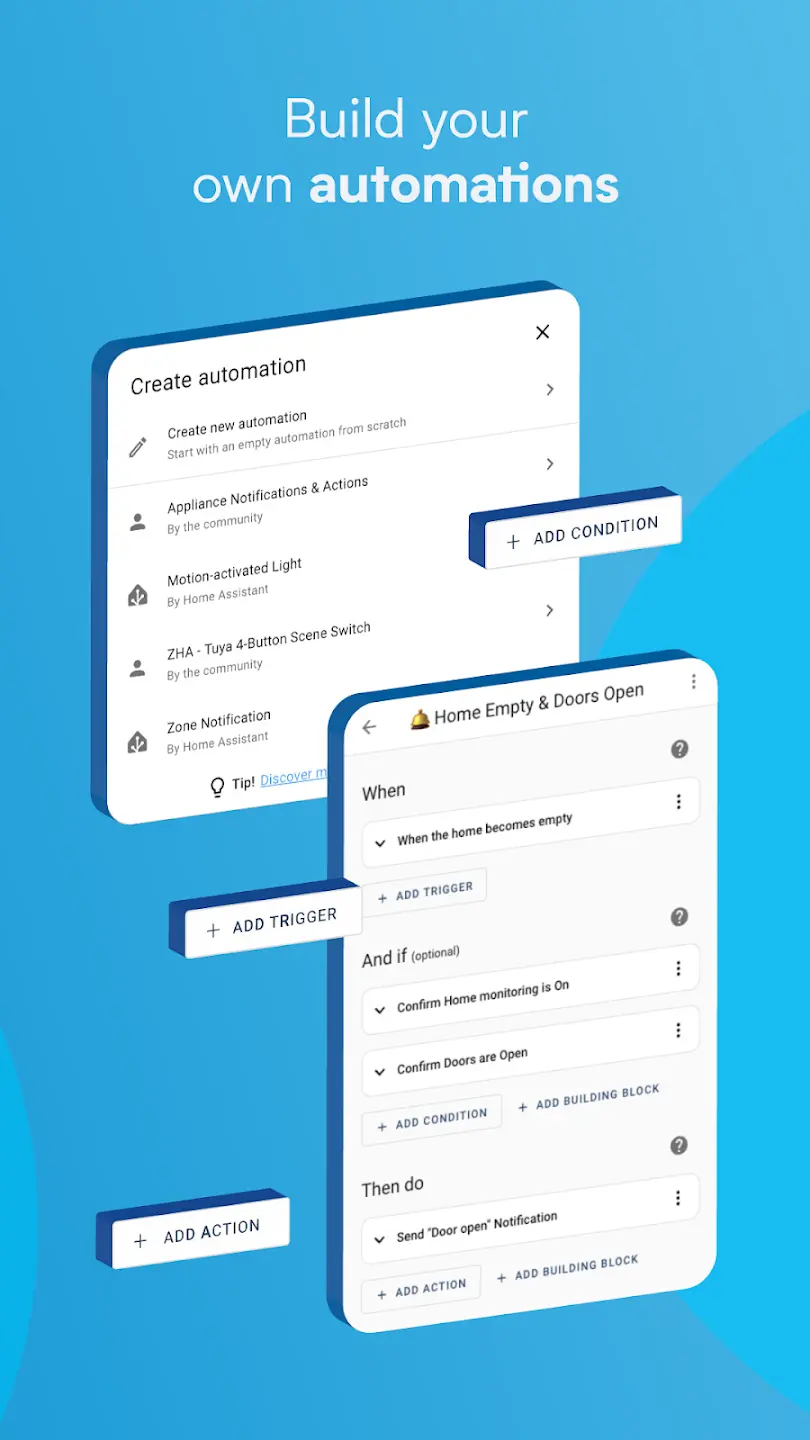
The web-based dashboard — called Lovelace — is the main control center. From here, users can view and control all connected devices, grouped by room or area. Cards can be fully customized to show sensors, switches, cameras, energy usage, and more. The automation editor is where the platform's real power shows: users define triggers (time, presence, sensor state, sunrise), set conditions, and choose actions. These automations run entirely locally, meaning they work even without internet access.
The companion mobile app extends this further. It feeds the phone's GPS location, battery level, and network status back to Home Assistant, which can trigger automations based on arrival or departure. Notifications, quick actions, and widgets are all configurable. For remote access outside the home network, users either set up their own tunnel or subscribe to Nabu Casa's Home Assistant Cloud, which handles secure remote access without requiring port forwarding. Add-ons, available through the built-in store, extend functionality with tools like Node-RED, Zigbee2MQTT, and custom voice assistants.
Strongest Points:
✓ Fully local processing — automations run without internet access or cloud dependency
✓ Compatible with over 3,000 brands and thousands of individual devices across all major smart home protocols
✓ Highly customizable dashboards, automations, and notification flows with no platform lock-in
✓ Strong privacy focus — no user data is sent to or stored by third parties by default
✓ Massive, active open-source community with regular monthly updates and extensive documentation
Weaker Points:
✕ Setup requires technical knowledge — not plug-and-play for non-technical users
✕ Requires separate hardware to run the server instance (not a standalone app)
✕ Updates can occasionally break existing automations or integrations
✕ The interface, while powerful, has a steep learning curve for beginners
✕ Remote access outside the home network requires additional configuration or a paid subscription



How to Use
Getting started with Home Assistant begins with installation. The platform runs on a range of hardware options — dedicated devices like the Home Assistant Green come with it pre-installed, while users with a Raspberry Pi or spare computer can install it manually. Once running, the setup wizard guides users through connecting to their local network, after which Home Assistant automatically scans for compatible devices and suggests integrations.
The web-based dashboard — called Lovelace — is the main control center. From here, users can view and control all connected devices, grouped by room or area. Cards can be fully customized to show sensors, switches, cameras, energy usage, and more. The automation editor is where the platform's real power shows: users define triggers (time, presence, sensor state, sunrise), set conditions, and choose actions. These automations run entirely locally, meaning they work even without internet access.
The companion mobile app extends this further. It feeds the phone's GPS location, battery level, and network status back to Home Assistant, which can trigger automations based on arrival or departure. Notifications, quick actions, and widgets are all configurable. For remote access outside the home network, users either set up their own tunnel or subscribe to Nabu Casa's Home Assistant Cloud, which handles secure remote access without requiring port forwarding. Add-ons, available through the built-in store, extend functionality with tools like Node-RED, Zigbee2MQTT, and custom voice assistants.
Strongest Points:
✓ Fully local processing — automations run without internet access or cloud dependency
✓ Compatible with over 3,000 brands and thousands of individual devices across all major smart home protocols
✓ Highly customizable dashboards, automations, and notification flows with no platform lock-in
✓ Strong privacy focus — no user data is sent to or stored by third parties by default
✓ Massive, active open-source community with regular monthly updates and extensive documentation
Weaker Points:
✕ Setup requires technical knowledge — not plug-and-play for non-technical users
✕ Requires separate hardware to run the server instance (not a standalone app)
✕ Updates can occasionally break existing automations or integrations
✕ The interface, while powerful, has a steep learning curve for beginners
✕ Remote access outside the home network requires additional configuration or a paid subscription
Use it For:
🏠 Homeowners who want full control over their smart home without relying on third-party cloud platforms.
🔒 Privacy-conscious users who want their home data to stay on their own hardware.
🔧 Tech-savvy individuals comfortable with initial setup and ongoing configuration.
⚡ People with mixed smart home ecosystems across multiple brands and protocols who need a unified platform.
📊 Users interested in tracking energy consumption, presence patterns, and sensor data over time.
App Usable on:
Phone
Tablet
PC
TV
Applications and Features
Home Assistant's core strength lies in its automation engine. Users can build complex multi-step automations with triggers based on time of day, device state, presence detection, sun position, weather data, or custom sensors. Conditions refine when automations fire, and actions can control any connected device, send notifications, run scripts, or call external services.
The dashboard system is fully modular. Dozens of card types — from basic switches and sliders to energy graphs, camera feeds, and weather forecasts — can be arranged, themed, and updated freely. Multiple dashboards can be created for different rooms, family members, or devices like tablets mounted on walls.
Presence detection is one of the more sophisticated features. Using the mobile app, Bluetooth, Wi-Fi, or third-party integrations, Home Assistant can track who is home at any given moment and trigger automations accordingly — a level of accuracy that closed platforms rarely match.
The voice assistant integration called Assist supports both cloud-connected assistants (Google Assistant, Amazon Alexa) and fully local voice control through Nabu Casa's own voice tools. The energy management dashboard tracks consumption per device and helps identify usage patterns.
Add-ons through the built-in supervisor interface bring in tools like file editors, database managers, and automation builders like Node-RED. The Home Assistant Community Store (HACS) adds hundreds of community-built integrations and dashboard components that extend the platform even further.
▽ Gadgets Related to this App ▽
App Summary
Home Assistant stands apart from most smart home platforms because it puts control entirely in the hands of the user. It runs locally, connects to an exceptionally wide range of devices, and operates without mandatory cloud accounts or subscriptions. The automation engine is among the most capable available, and the dashboard system can be shaped to fit almost any use case or household setup.
That said, it is not a beginner-friendly platform out of the box. Getting it running requires hardware, a willingness to follow technical documentation, and patience through an initial learning period. Updates ship monthly and the community is active, but occasional breaking changes are a reality of a fast-moving open-source project.
For those who are prepared to invest time in the setup, Home Assistant delivers a smart home experience that no closed platform currently matches in terms of flexibility, privacy, and long-term independence.
Pricing:
Free
Cheap
Mid
Pricy
High
Free
Cheap
Mid
Pricy
High
Free
Cheap
Mid
Pricy
High
Free
Cheap
Mid
Pricy
High
Free
Cheap
Mid
Pricy
High
The Home Assistant software itself is free and open source. Users need their own hardware to run it, with dedicated devices ranging from around $70 to $200 depending on the model chosen. The optional Home Assistant Cloud subscription (Nabu Casa) costs approximately $6.50 per month or $65 per year and adds secure remote access, voice assistant integration, and text-to-speech capabilities.
Learning Difficulty:
Home Assistant requires initial hardware setup, server installation, and a working understanding of how automations, integrations, and dashboards are structured before the platform can be used effectively.
Required Skill Sets:
Users benefit from basic familiarity with networking concepts and comfort following technical documentation, particularly during the initial setup phase.
Educational Content:
▽ Related Apps ▽

The Wonder Weeks generates a personalised developmental calendar based on a baby’s due date, predicting when each of the 10 mental leaps will occur and notifying parents in advance so they understand their baby’s fussy periods, new skills, and how to support each leap.

Houzz lets users browse millions of home design photos, save ideas, shop for products, and connect with verified local renovation professionals.

Scans rooms via AR or LiDAR to generate accurate 2D and 3D floor plans, creates structured field reports with photos and notes, and produces material and labor cost estimates — all from a smartphone or tablet.

1/4
Questions & Answers: ⮛ (click to open)
Does Home Assistant work without an internet connection?
Yes. The platform runs entirely on local hardware and all automations execute locally, which means the system continues to function during internet outages. Remote access from outside the home requires either a manual network setup or the Nabu Casa cloud subscription.
What hardware is needed to run Home Assistant?
Home Assistant runs on a range of devices including a Raspberry Pi, a dedicated Home Assistant Green or Yellow hub, or any Linux-capable machine. The software itself is free; the hardware investment typically ranges from $70 to $200 depending on the option chosen.
Can Home Assistant connect to devices from different brands at the same time?
Yes. Home Assistant integrates with over 3,000 brands and supports protocols including Zigbee, Z-Wave, Matter, Thread, and Wi-Fi simultaneously. This makes it possible to manage devices from completely different ecosystems — such as Philips Hue, Sonos, and IKEA — through a single interface.
Is the mobile app included with the free version?
The companion mobile app for iOS and Android is free to download and use. It provides remote control, location tracking, push notifications, and device-triggered automations. The app connects to a user's own Home Assistant server; no paid subscription is required to use the core mobile features.
Good to Knows: ⮛ (click to open)
Home Assistant operates entirely offline once configured — automations continue to run even during internet outages.
The platform is available in over 60 languages and has millions of active installations worldwide.
Hardware add-ons like Zigbee or Z-Wave USB dongles are required to connect certain device types that don't use Wi-Fi.
Takeaways: ⮛ (click to open)
Home Assistant is the most flexible and privacy-respecting smart home platform available, but it requires technical investment to set up and maintain.
The free core platform combined with an optional low-cost cloud subscription makes it highly competitive on price compared to proprietary alternatives.
Did You Get Any of That?
Related Science Articles:
Explore Other App Solutions With our Blogs
Discover how different apps approach common challenges, what they do well, and where they fall short — helping you understand which tools are best suited for your specific goals and daily routines.
Swipe Less, Talk Better: 5 AI Dating Apps That Might Actually Fix Your Texting
Five AI dating and relationship apps compared — find out which ones build real skills and which ones just write your messages for you.

Gadgifyr Apps
July 30, 2026
-
9 min

The Quiet Ones: 5 Apps Doing Something No One Else Bothered To
Five genuinely inventive apps compared — find out which ones are simply clever and which are actually useful.
Gadgifyr Apps
July 19, 2026
-
9 min

After You Hit "Book": 5 Apps That Make the Trip Itself Better
Five travel apps compared on what they offer before, during, and after the trip — beyond flights, hotels, and bookings.
Gadgifyr Apps
July 14, 2026
-
9 min

Notes That Talk to Each Other: 5 Apps for Thinking, Not Just Typing
Obsidian, Notion, Evernote, OneNote, and Joplin compared — find out which one turns scattered notes into a system that actually connects your ideas.
Gadgifyr Apps
July 11, 2026
-
9 min




Where Curiosity Finds Its Match
Dive into Gadgifyr’s world of honest gadget reviews, scientific clarity, app reviews, and real tools designed to make everyday life smarter and simpler.
Clarity Behind Every Tool
Gadgifyr reviews apps and gadgets through structured analysis and science-backed insight. It focuses on how tools actually work, where they deliver real value, and how they fit into everyday routines.
Each review highlights functionality, usability, and limitations in a clear and practical way. This approach helps users understand which tools are worth using and make informed decisions with confidence.


Why People Trust Gadgifyr App Reviews
Because we go beyond popularity — we uncover new apps, explain how they work, and show what truly adds value. From hidden tools to well-known platforms, we help you understand what fits your needs.


