

Planner 5D
Builds 2D floor plans and 3D room visualizations, furnishes and decorates spaces from an 8,000+ item catalog, generates photorealistic renders, automatic AI use.
Professional-looking home design results — without a design background.
Planner 5D is a home design and interior planning platform developed by Planner 5D that targets the large gap between professional CAD software and basic room layout tools. The platform is built for homeowners, renovation planners, interior design students, and light-professional designers who need to visualize a space realistically before committing to furniture purchases, renovation decisions, or client presentations — without the steep learning curve of tools like AutoCAD, SketchUp, or Revit.
The core proposition is accessibility: a user with no design training can open the platform, draw a floor plan, furnish it from a catalog of over 8,400 items, switch to a 3D walkthrough view, and generate a photorealistic render — all within a single session. AI tools accelerate this further, with features like the Smart Wizard (which auto-furnishes rooms) and AI Plan Recognition (which converts uploaded blueprint images into editable 3D projects) reducing the manual work involved in setting up a design from scratch.
Planner 5D is available across iOS, Android, web, macOS, and Windows, and supports VR, AR, and — at the enterprise level — Apple Vision Pro, making it one of the most platform-flexible design tools in the consumer-to-prosumer range.
Apps are frequently updated and may change over time. While we aim to keep our reviews accurate and up to date, some information may become outdated or no longer reflect the current version.
Disclaimer ▽ (click open)
How to Use
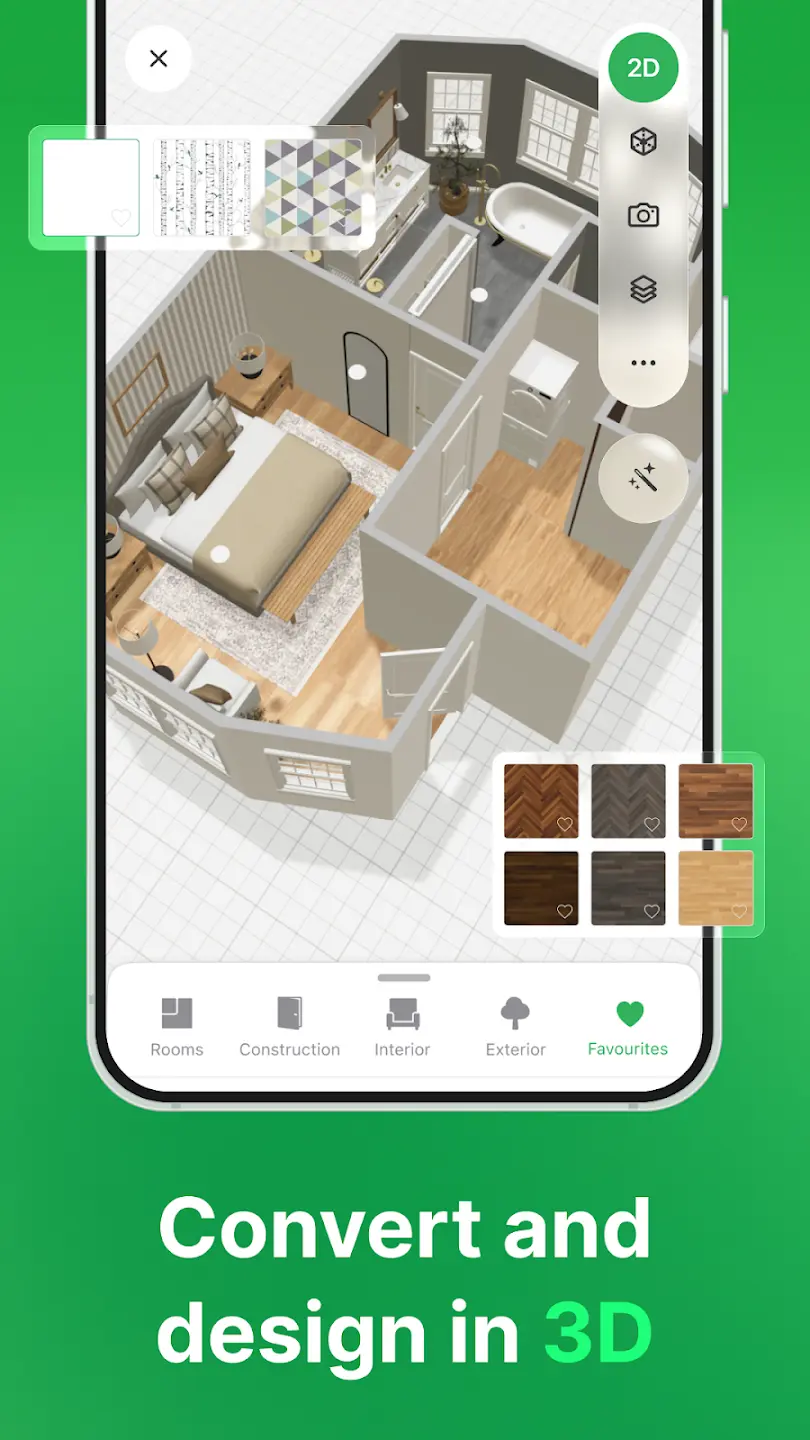
Starting a project requires an account, which can be created via email, Google, Apple, or Facebook. From there, users either start with a blank floor plan or upload an existing blueprint image for automatic AI recognition and conversion into an editable 3D layout. The 2D mode uses a grid-based canvas where walls snap together at correct angles, and doors and windows attach automatically to walls — making the drawing process considerably faster than manual CAD tools.
Once the floor plan is in place, switching to 3D view is instantaneous. Users can navigate the rendered space in a first-person walkthrough, getting a realistic sense of scale, light, and spatial flow before making any physical changes. Furniture and decor are added by browsing the 8,400+ item catalog — searchable by category, style, and room type — and dragging items into position. Each object can be resized, recolored, and repositioned with precise controls.
For users who want AI to do more of the work, the Smart Wizard auto-furnishes a room based on selected style preferences, and the AI Designer generates personalized décor recommendations. Textures and materials can be applied to walls, floors, and surfaces, with custom uploads available on paid plans.
Finished designs can be exported as HD or 4K photorealistic renders, 360° panoramas, or shared via a guest link for client review without requiring the viewer to create an account. The Design School feature — included in Premium — provides guided lessons for users who want to develop their design capabilities more formally.
Strongest Points:
✓ Accessible to complete beginners — functional floor plans and 3D visualizations are achievable within minutes of first use
✓ AI Plan Recognition converts uploaded blueprint images into editable 3D projects automatically, eliminating manual redrawing
✓ 8,400+ item catalog covering furniture, décor, structural elements, and textures across a wide range of styles and price points
✓ Available across iOS, Android, web, macOS, and Windows — one of the broadest cross-platform footprints in the consumer design software category
✓ Smart Wizard and AI Designer automate room furnishing and décor suggestions, reducing design time significantly for non-professionals
Weaker Points:
✕ A meaningful portion of the item catalog and key features — including AI tools, HD renders, and texture editing — are locked behind paid plans
✕ Documented billing issues across 2024–2025, including unexpected charges after free trials and reported difficulty canceling subscriptions
✕ 3D rendering and walkthrough can lag or crash on older or lower-spec mobile devices
✕ Not suitable for technical professional use — insufficient precision and export formats for architects or engineers working to regulatory standards
✕ Trustpilot and App Store review sentiment diverges sharply, with billing practices cited as the most consistent criticism on third-party platforms


How to Use
Starting a project requires an account, which can be created via email, Google, Apple, or Facebook. From there, users either start with a blank floor plan or upload an existing blueprint image for automatic AI recognition and conversion into an editable 3D layout. The 2D mode uses a grid-based canvas where walls snap together at correct angles, and doors and windows attach automatically to walls — making the drawing process considerably faster than manual CAD tools.
Once the floor plan is in place, switching to 3D view is instantaneous. Users can navigate the rendered space in a first-person walkthrough, getting a realistic sense of scale, light, and spatial flow before making any physical changes. Furniture and decor are added by browsing the 8,400+ item catalog — searchable by category, style, and room type — and dragging items into position. Each object can be resized, recolored, and repositioned with precise controls.
For users who want AI to do more of the work, the Smart Wizard auto-furnishes a room based on selected style preferences, and the AI Designer generates personalized décor recommendations. Textures and materials can be applied to walls, floors, and surfaces, with custom uploads available on paid plans.
Finished designs can be exported as HD or 4K photorealistic renders, 360° panoramas, or shared via a guest link for client review without requiring the viewer to create an account. The Design School feature — included in Premium — provides guided lessons for users who want to develop their design capabilities more formally.
Strongest Points:
✓ Accessible to complete beginners — functional floor plans and 3D visualizations are achievable within minutes of first use
✓ AI Plan Recognition converts uploaded blueprint images into editable 3D projects automatically, eliminating manual redrawing
✓ 8,400+ item catalog covering furniture, décor, structural elements, and textures across a wide range of styles and price points
✓ Available across iOS, Android, web, macOS, and Windows — one of the broadest cross-platform footprints in the consumer design software category
✓ Smart Wizard and AI Designer automate room furnishing and décor suggestions, reducing design time significantly for non-professionals
Weaker Points:
✕ A meaningful portion of the item catalog and key features — including AI tools, HD renders, and texture editing — are locked behind paid plans
✕ Documented billing issues across 2024–2025, including unexpected charges after free trials and reported difficulty canceling subscriptions
✕ 3D rendering and walkthrough can lag or crash on older or lower-spec mobile devices
✕ Not suitable for technical professional use — insufficient precision and export formats for architects or engineers working to regulatory standards
✕ Trustpilot and App Store review sentiment diverges sharply, with billing practices cited as the most consistent criticism on third-party platforms
Use it For:
🏠 Homeowners planning a renovation or furniture layout who want to visualize results before spending money or moving anything physically
🎓 Interior design students who need an accessible, affordable tool for developing concept presentations and portfolio renders
💼 Light-professional designers working with residential clients who need shareable 3D visualizations and renders without investing in full CAD software
🔄 Real estate professionals or staging consultants who need to quickly furnish and render empty spaces for listings or client presentations
🖥️ Users who want a consistent design experience across phone, tablet, and desktop without platform limitations or file compatibility issues
App Usable on:
Phone
Tablet
PC
TV
Applications and Features
Planner 5D's design workflow is structured around three core activities: sketching, visualizing, and rendering. The sketching layer handles floor plan creation — walls, rooms, doors, windows, and structural features are drawn on a 2D canvas that automatically enforces alignment and snapping. For users with an existing blueprint, the AI Plan Recognition feature accepts uploaded floor plan images and converts them into editable 3D projects, bypassing the drawing stage entirely.
The visualization layer is where Planner 5D's consumer appeal is clearest. The 3D walkthrough mode gives an immediate first-person view of the space at any stage of design — users can walk through a furnished room, assess proportions, and evaluate lighting effects before committing to any real-world decision. The catalog of 8,400+ items includes furniture, lighting, textiles, structural elements, and outdoor objects, with filters for room type, style, and material. All objects are adjustable in size, color, and position.
The Smart Wizard auto-furnishes an empty room in seconds based on room type and style preferences — a meaningful time-saver for users who want a visual starting point rather than a blank canvas. The AI Designer goes further, analyzing the existing design and suggesting complementary décor additions based on style coherence. Both tools are Premium-tier features.
The rendering layer produces photorealistic output: HD renders (5 per month on Premium, unlimited at Pro), 4K renders (Pro and above), 360° panoramas, and 3D walkthroughs. These outputs are shareable via a direct project link — no app required for the recipient — making them practical for client presentations or renovation consultations.
Additional capabilities include a Design School with guided lessons, moodboard creation (Pro), 3D model import for custom assets (Pro), and at the Enterprise level, full AR/VR support, white-label deployment, product showcase integration, and Apple Vision Pro compatibility.
▽ Gadgets Related to this App ▽
App Summary
Planner 5D occupies a well-defined position in the home design software market: accessible enough for a first-time user to produce credible results in a single session, feature-rich enough to support light professional use cases, and broadly available across more platforms than most comparable tools. Its AI-powered features, photorealistic rendering pipeline, and 8,400+ item catalog give it a practical depth that generic room planners cannot match.
Where it falls short is in the gap between its free and paid tiers — the free plan is genuinely limited, and the value of the paid plans is somewhat undermined by recurring billing complaints that are specific enough and widespread enough to warrant caution. For users who subscribe carefully and engage consistently, Planner 5D delivers real value. For homeowners visualizing renovations, design students building portfolios, and light-professional designers needing shareable renders, it remains one of the most capable and accessible tools in its price range.
Pricing:
Free
Cheap
Mid
Pricy
High
Free
Cheap
Mid
Pricy
High
Free
Cheap
Mid
Pricy
High
Free
Cheap
Mid
Pricy
High
Free
Cheap
Mid
Pricy
High
Planner 5D offers a free Basic plan with limited catalog access and no rendering. The Premium plan starts at approximately $4.99 per month (annual billing), giving access to AI tools, the full item catalog, and 5 renders per month. The Pro plan unlocks unlimited 4K renders, 3D model import, moodboard tools, and a professional profile. While the entry-level pricing is competitive, documented billing irregularities — particularly around free trials and cancellation — add friction that users should be aware of before subscribing.
Learning Difficulty:
The core design workflow — drawing walls, furnishing rooms, and switching between 2D and 3D views — is intuitive and does not require prior design knowledge. Users may need additional time to explore AI tools, rendering settings, and Pro-tier features, but the baseline experience is genuinely beginner-friendly.
Required Skill Sets:
No technical or design background is required to use Planner 5D effectively at the consumer level — the platform is built to be self-explanatory from the first session.
Educational Content:
▽ Related Apps ▽

The Wonder Weeks generates a personalised developmental calendar based on a baby’s due date, predicting when each of the 10 mental leaps will occur and notifying parents in advance so they understand their baby’s fussy periods, new skills, and how to support each leap.

Home Assistant lets users automate, monitor, and control all smart home devices from a single interface without relying on external cloud services.

Houzz lets users browse millions of home design photos, save ideas, shop for products, and connect with verified local renovation professionals.

1/4
Questions & Answers: ⮛ (click to open)
How does AI Plan Recognition work in Planner 5D?
Users upload a photo or image of an existing floor plan — a hand-drawn sketch, a printed blueprint, or a photographed document — and the AI analyzes it to generate an editable 3D project. Walls, rooms, and structural elements are detected and converted automatically. The result is not always perfect, particularly with complex or irregular layouts, but it significantly reduces the setup time compared to drawing a plan from scratch.
Is Planner 5D accurate enough for real renovation planning?
For consumer and light-professional use, the measurement tools and scaling features are sufficient to plan furniture placement, assess spatial flow, and evaluate renovation layouts with reasonable confidence. The platform is not, however, a substitute for professional-grade CAD tools in terms of dimensional accuracy or technical export formats. It should be treated as a visualization and decision-support tool rather than a construction documentation instrument.
What is the difference between the Premium and Pro plans?
Premium gives access to AI tools, the full 8,400+ item catalog, texture editing, 5 photorealistic renders per month, and the Design School. Pro includes everything in Premium plus unlimited 4K renders, 3D model import for custom assets, moodboard creation, 360° panorama output, and a professional profile for client-facing promotion. Pro is aimed at designers using the platform commercially; Premium suits homeowners and students.
Can designs be shared with someone who does not have a Planner 5D account?
Yes. Planner 5D allows projects to be shared via a secure guest link that recipients can view without creating an account or installing the app. This makes it practical for sharing renders or walkthroughs with clients, family members, or contractors who do not use the platform themselves.
Good to Knows: ⮛ (click to open)
Planner 5D has surpassed 10 million downloads and holds a 4.2–4.4 star rating across iOS and Android app stores — one of the stronger adoption signals in the consumer design software category.
Purchasing a subscription through the web platform rather than the iOS App Store can be significantly cheaper in some regions — iOS in-app pricing has been reported to be up to double the web rate due to regional markup differences.
The Enterprise tier supports Apple Vision Pro, full AR/VR deployment, and white-label integration — extending the platform beyond consumer use into B2B real estate and retail applications.
Takeaways: ⮛ (click to open)
Planner 5D's AI Plan Recognition is its most practically time-saving feature for users starting from an existing floor plan — it eliminates the manual redrawing step entirely.
The free plan provides enough access to evaluate the platform meaningfully, but serious use requires a paid subscription — users who want renders, full catalog access, and AI tools should budget for at least the Premium tier.
Billing practices represent the most documented risk associated with the platform — users should cancel trials well in advance, use in-platform cancellation tools, and avoid subscribing via the iOS App Store where possible.
Did You Get Any of That?
Related Science Articles:
Explore Other App Solutions With our Blogs
Discover how different apps approach common challenges, what they do well, and where they fall short — helping you understand which tools are best suited for your specific goals and daily routines.
Swipe Less, Talk Better: 5 AI Dating Apps That Might Actually Fix Your Texting
Five AI dating and relationship apps compared — find out which ones build real skills and which ones just write your messages for you.

Gadgifyr Apps
July 30, 2026
-
9 min

The Quiet Ones: 5 Apps Doing Something No One Else Bothered To
Five genuinely inventive apps compared — find out which ones are simply clever and which are actually useful.
Gadgifyr Apps
July 19, 2026
-
9 min

After You Hit "Book": 5 Apps That Make the Trip Itself Better
Five travel apps compared on what they offer before, during, and after the trip — beyond flights, hotels, and bookings.
Gadgifyr Apps
July 14, 2026
-
9 min

Notes That Talk to Each Other: 5 Apps for Thinking, Not Just Typing
Obsidian, Notion, Evernote, OneNote, and Joplin compared — find out which one turns scattered notes into a system that actually connects your ideas.
Gadgifyr Apps
July 11, 2026
-
9 min



Where Curiosity Finds Its Match
Dive into Gadgifyr’s world of honest gadget reviews, scientific clarity, app reviews, and real tools designed to make everyday life smarter and simpler.
Clarity Behind Every Tool
Gadgifyr reviews apps and gadgets through structured analysis and science-backed insight. It focuses on how tools actually work, where they deliver real value, and how they fit into everyday routines.
Each review highlights functionality, usability, and limitations in a clear and practical way. This approach helps users understand which tools are worth using and make informed decisions with confidence.


Why People Trust Gadgifyr App Reviews
Because we go beyond popularity — we uncover new apps, explain how they work, and show what truly adds value. From hidden tools to well-known platforms, we help you understand what fits your needs.


