

Moon+ Reader
Read, organize, customize, annotate, sync, and manage digital books across multiple formats.
A highly customizable reading environment for Android users.
Moon+ Reader is an Android-based eBook reading application designed for users who want more control over how digital books are displayed and managed. Instead of focusing only on buying books through a store, the app is built around reading flexibility, allowing users to import their own files and customize nearly every aspect of the reading experience.
The app supports a very large range of file formats including EPUB, PDF, MOBI, CBZ, DOCX, TXT, and HTML, making it suitable for readers with personal digital libraries. It also includes tools such as annotations, highlighting, cloud synchronization, text-to-speech support, brightness gestures, and advanced typography settings.
Moon+ Reader mainly tries to solve a common problem in eBook apps: limited control. It gives readers the ability to adapt the interface, navigation, and reading behavior to their own preferences rather than forcing a fixed experience.
Apps are frequently updated and may change over time. While we aim to keep our reviews accurate and up to date, some information may become outdated or no longer reflect the current version.
Disclaimer ▽ (click open)
How to Use
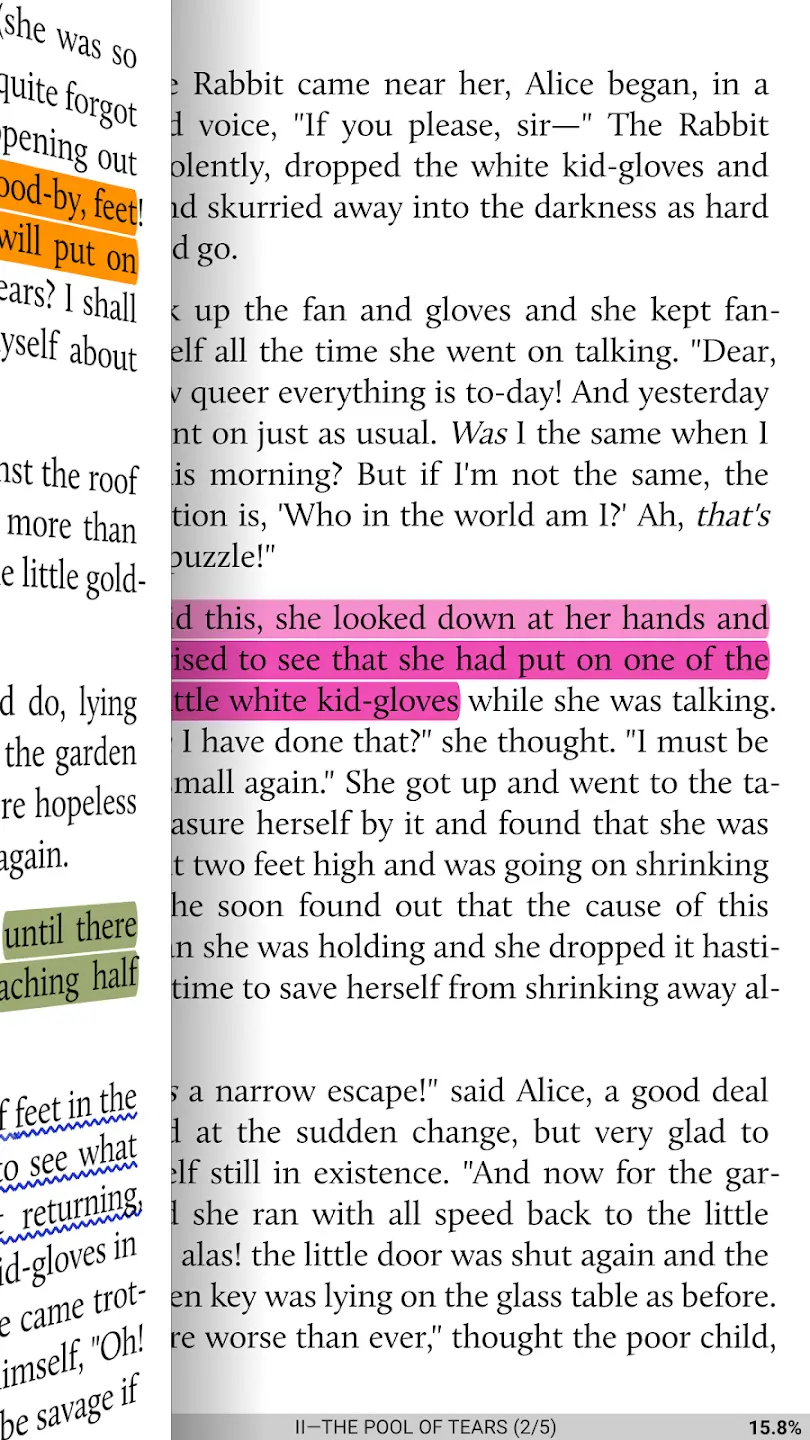
Moon+ Reader works as a local and cloud-based digital library manager combined with an advanced reading engine. After installation, users can import books directly from device storage, cloud services, downloads, or online catalogs. The app automatically scans and organizes files into a bookshelf view based on authors, tags, favorites, or folders.
The core idea behind the app is customization. Instead of simply opening a book and reading, users can adjust nearly every reading parameter. Font size, spacing, themes, margins, page animations, scrolling behavior, orientation, and gesture controls can all be modified. This allows the app to adapt to different reading styles, eye comfort preferences, and screen sizes.
The reading system itself is designed to reduce friction during long reading sessions. Features such as night mode, brightness gestures, auto-scroll, focus rulers, and dual-page layouts aim to make reading more comfortable over time.
Moon+ Reader also includes productivity-focused tools. Users can highlight passages, create notes, translate text, use dictionaries, sync progress across devices, and activate text-to-speech playback. The Pro version removes ads and unlocks deeper customization and statistics tracking.
The app is available mainly for Android phones and Android tablets. It is not officially available for iPhone, iPad, Windows, macOS, or smart TVs.
Strongest Points:
✓ Extremely high level of reading customization
✓ Supports many eBook and document formats
✓ Strong annotation and highlighting system
✓ Comfortable long-session reading tools
✓ Cloud sync and backup support
Weaker Points:
✕ Interface can feel overwhelming for new users
✕ Some menus look outdated compared to newer apps
✕ PDF handling is weaker than dedicated PDF readers
✕ No official iOS or desktop version
✕ Advanced settings require time to understand



How to Use
Moon+ Reader works as a local and cloud-based digital library manager combined with an advanced reading engine. After installation, users can import books directly from device storage, cloud services, downloads, or online catalogs. The app automatically scans and organizes files into a bookshelf view based on authors, tags, favorites, or folders.
The core idea behind the app is customization. Instead of simply opening a book and reading, users can adjust nearly every reading parameter. Font size, spacing, themes, margins, page animations, scrolling behavior, orientation, and gesture controls can all be modified. This allows the app to adapt to different reading styles, eye comfort preferences, and screen sizes.
The reading system itself is designed to reduce friction during long reading sessions. Features such as night mode, brightness gestures, auto-scroll, focus rulers, and dual-page layouts aim to make reading more comfortable over time.
Moon+ Reader also includes productivity-focused tools. Users can highlight passages, create notes, translate text, use dictionaries, sync progress across devices, and activate text-to-speech playback. The Pro version removes ads and unlocks deeper customization and statistics tracking.
The app is available mainly for Android phones and Android tablets. It is not officially available for iPhone, iPad, Windows, macOS, or smart TVs.
Strongest Points:
✓ Extremely high level of reading customization
✓ Supports many eBook and document formats
✓ Strong annotation and highlighting system
✓ Comfortable long-session reading tools
✓ Cloud sync and backup support
Weaker Points:
✕ Interface can feel overwhelming for new users
✕ Some menus look outdated compared to newer apps
✕ PDF handling is weaker than dedicated PDF readers
✕ No official iOS or desktop version
✕ Advanced settings require time to understand
Use it For:
📚 Readers with large personal eBook libraries
🛠️ Users who want advanced reading customization
🌙 People who read for long periods at night
🎓 Students needing annotations and highlights
📱 Android users looking for a flexible offline reader
App Usable on:
Phone
Tablet
PC
TV
Applications and Features
Moon+ Reader is primarily built for users who already own digital books or download documents from different sources. Unlike ecosystem-focused apps, it does not depend heavily on a proprietary bookstore. Instead, the app focuses on becoming a universal reading environment for many file types.
One of its biggest strengths is how deeply the reading experience can be personalized. Users can configure gestures, page animations, hardware button controls, themes, and typography in ways that many mainstream readers do not allow. This makes the app especially attractive for readers who spend many hours inside eBooks.
The app also stands out because of its reading utility tools. Built-in dictionaries, translation support, text-to-speech playback, bookmarks, reading statistics, and focus modes help turn the app into more than a simple file viewer.
Cloud integration through Dropbox and WebDAV allows reading positions and annotations to sync between Android devices. Compared to simpler reading apps, Moon+ Reader places much more emphasis on control and functionality rather than visual simplicity.
▽ Gadgets Related to this App ▽
App Summary
Moon+ Reader is designed for Android users who want full control over their digital reading experience rather than a simplified bookstore-centered platform. Its main strength comes from the depth of customization it offers, allowing readers to adjust nearly every visual and functional aspect of how books are displayed and navigated.
The app works particularly well for users with personal EPUB, PDF, MOBI, or comic collections who need one place to organize and read multiple formats. Features such as annotations, syncing, gesture controls, text-to-speech support, and long-session comfort tools help create a reading environment focused on flexibility and efficiency.
At the same time, the large number of settings can make the interface feel complex for beginners. Users looking for a minimal and highly polished design may prefer simpler alternatives, while advanced readers are more likely to benefit from the app’s extensive functionality and configurability.
Pricing:
Free
Cheap
Mid
Pricy
High
Free
Cheap
Mid
Pricy
High
Free
Cheap
Mid
Pricy
High
Free
Cheap
Mid
Pricy
High
Free
Cheap
Mid
Pricy
High
Moon+ Reader offers a free version with advertisements and optional in-app purchases. The Pro version is a one-time purchase that removes ads and unlocks additional customization, synchronization, and statistics features, making it competitively priced compared to other advanced Android reading apps.
Learning Difficulty:
Basic reading functions are easy to start with, but the large amount of customization and settings requires time to fully understand. Users who enjoy configuring apps will adapt more quickly.
Required Skill Sets:
No technical expertise is required, but users benefit from basic file management and familiarity with digital book formats.
Educational Content:
▽ Related Apps ▽

Seek identifies plants, animals, fungi, and other living things in real time by pointing the camera at them.

Sky Guide uses augmented reality and device sensors to overlay real-time astronomical data onto the night sky, allowing users to identify and learn about any visible celestial object instantly.

Merlin Bird ID identifies birds in real time by listening to their songs and calls, analyzing uploaded photos, or guiding users through a short set of questions about what they saw.

1/4
Questions & Answers: ⮛ (click to open)
Does Moon+ Reader include its own bookstore?
The app supports online libraries and catalog integration, but its main purpose is reading imported or locally stored books. It is designed more as a reading platform than a commercial book marketplace.
Why do many users prefer Moon+ Reader over simpler reading apps?
Many users value the high level of customization and format support. The app allows readers to tailor the interface, gestures, themes, and typography far beyond what many standard eBook apps provide.
Is Moon+ Reader suitable for academic or study use?
Yes. Features like highlighting, annotations, dictionaries, translations, bookmarks, and note-taking make it useful for studying and document review. However, dedicated PDF academic tools may still offer stronger document editing features.
Can the app sync books between devices?
Yes. Moon+ Reader supports synchronization through services like Dropbox and WebDAV. This allows reading positions, notes, and highlights to be shared across compatible Android devices.
Good to Knows: ⮛ (click to open)
• Supports EPUB, PDF, MOBI, CBZ, CBR, DOCX, TXT, HTML, and many other formats
• Includes Dropbox and WebDAV synchronization for reading progress and annotations
• Offers text-to-speech support in the Pro version for audio-style reading
Takeaways: ⮛ (click to open)
• Moon+ Reader focuses more on reading flexibility than content purchasing
• The app is strongest for Android users who want advanced control over formatting and navigation
• Its feature depth is significantly higher than most standard mobile eBook readers
Did You Get Any of That?
Related Science Articles:
Explore Other App Solutions With our Blogs
Discover how different apps approach common challenges, what they do well, and where they fall short — helping you understand which tools are best suited for your specific goals and daily routines.
Swipe Less, Talk Better: 5 AI Dating Apps That Might Actually Fix Your Texting
Five AI dating and relationship apps compared — find out which ones build real skills and which ones just write your messages for you.

Gadgifyr Apps
July 30, 2026
-
9 min

The Quiet Ones: 5 Apps Doing Something No One Else Bothered To
Five genuinely inventive apps compared — find out which ones are simply clever and which are actually useful.
Gadgifyr Apps
July 19, 2026
-
9 min

After You Hit "Book": 5 Apps That Make the Trip Itself Better
Five travel apps compared on what they offer before, during, and after the trip — beyond flights, hotels, and bookings.
Gadgifyr Apps
July 14, 2026
-
9 min

Notes That Talk to Each Other: 5 Apps for Thinking, Not Just Typing
Obsidian, Notion, Evernote, OneNote, and Joplin compared — find out which one turns scattered notes into a system that actually connects your ideas.
Gadgifyr Apps
July 11, 2026
-
9 min



Where Curiosity Finds Its Match
Dive into Gadgifyr’s world of honest gadget reviews, scientific clarity, app reviews, and real tools designed to make everyday life smarter and simpler.
Clarity Behind Every Tool
Gadgifyr reviews apps and gadgets through structured analysis and science-backed insight. It focuses on how tools actually work, where they deliver real value, and how they fit into everyday routines.
Each review highlights functionality, usability, and limitations in a clear and practical way. This approach helps users understand which tools are worth using and make informed decisions with confidence.


Why People Trust Gadgifyr App Reviews
Because we go beyond popularity — we uncover new apps, explain how they work, and show what truly adds value. From hidden tools to well-known platforms, we help you understand what fits your needs.


