

Rock Identifier
Rock Identifier identifies rocks, crystals, and minerals by analyzing a photo taken with a smartphone camera and returning instant results with geological data.
A pocket geologist for curious minds and outdoor explorers.
Rock Identifier is a mobile app that uses artificial intelligence to identify rocks, minerals, crystals, and gemstones from a simple photo. Aimed at anyone from curious hikers to geology students, the app removes the need for expert knowledge to understand what a stone actually is. Users snap or upload a photo, and the app returns a name, classification, and a detailed profile of the specimen within seconds.
The app covers a broad audience. Rock collectors use it to catalog finds. Students use it as a study companion. Hikers use it to satisfy curiosity on the trail. The database spans over 6,000 types of rocks and minerals, giving it meaningful coverage across common stones and rarer geological specimens. Alongside identification, the app provides information on hardness, chemical composition, formation process, geological age, and practical uses — making it useful both as a field tool and as an educational resource. It is available on iOS and Android, and most versions offer a free entry point with premium features behind a subscription.
Apps are frequently updated and may change over time. While we aim to keep our reviews accurate and up to date, some information may become outdated or no longer reflect the current version.
Disclaimer ▽ (click open)
How to Use
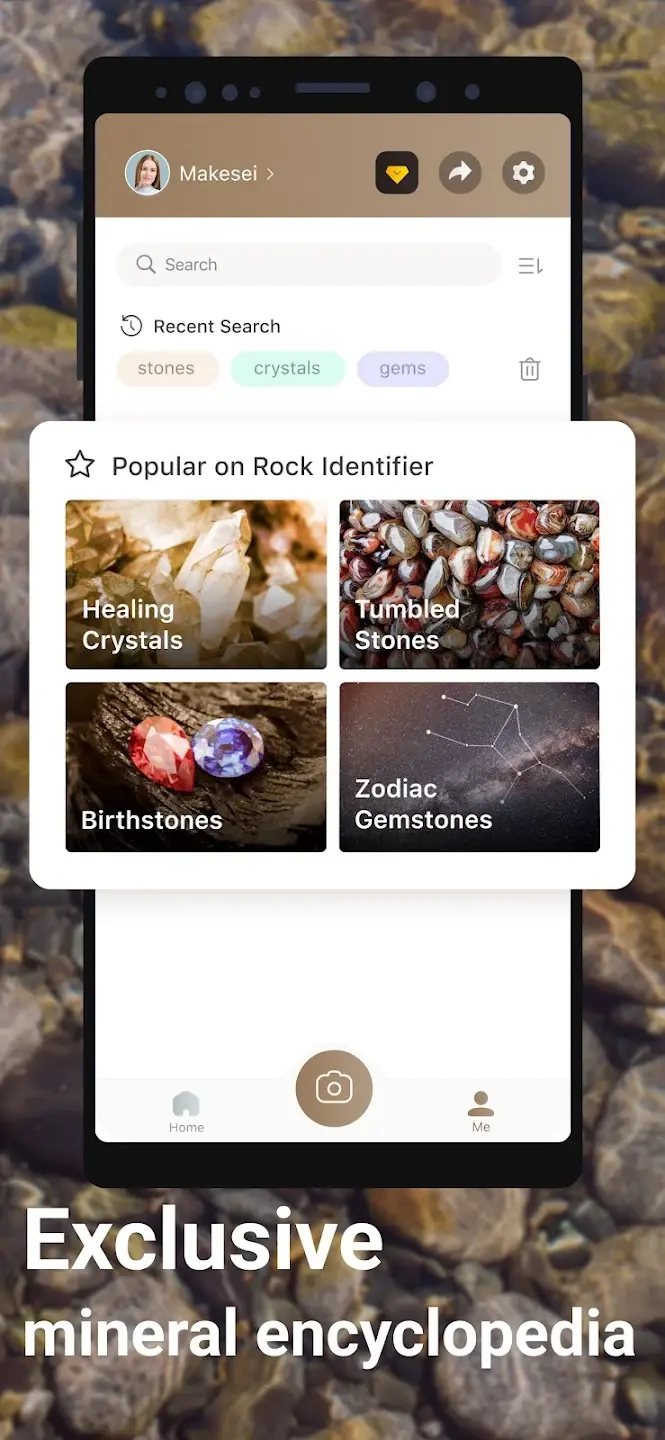
Getting started with Rock Identifier requires no geological knowledge. After downloading the app and creating a brief account, users are presented with a clean scanning interface. The core action is simple: point the camera at a rock, take a photo, or upload an existing image from the gallery. The AI engine processes the image and returns a match, typically within a few seconds.
The result screen shows the rock's name, type category (igneous, sedimentary, or metamorphic), and a confidence rating for the identification. Below that, users can read detailed information covering mineral composition, hardness on the Mohs scale, color and texture characteristics, how and where the rock typically forms, its geological age range, and common practical or industrial uses.
Saving finds is built directly into the workflow. Each identified specimen can be stored in a personal collection, allowing users to build a searchable history of their finds. Some versions include a wishlist feature for gems or stones users want to locate in the future. An encyclopedia section lets users browse the database independently from the scan function, useful for study or general exploration.
For users who want to go deeper, several Rock Identifier versions include an AI chat function that answers follow-up questions about a specific rock or geological topic. The app also includes a gemstone authentication guide to help users understand how to distinguish real gemstones from synthetic or imitation ones by examining physical characteristics.
Strongest Points:
✓ Identifies over 6,000 rock, mineral, and crystal types from a single photo
✓ Provides detailed geological data including hardness, formation, chemical composition, and age
✓ Personal collection manager to catalog, note, and organize finds
✓ Beginner-friendly interface with no geological background required
✓ Confidence rating shown per identification, adding transparency to AI results
Weaker Points:
✕ Accuracy inconsistencies reported, particularly with less common rock types
✕ Free usage is limited — full identification access typically requires a subscription
✕ Some versions hit a scan limit even on paid plans before resetting
✕ Identification results can vary when the same specimen is scanned multiple times
✕ Subscription pricing structure is not always transparent at first glance


How to Use
Getting started with Rock Identifier requires no geological knowledge. After downloading the app and creating a brief account, users are presented with a clean scanning interface. The core action is simple: point the camera at a rock, take a photo, or upload an existing image from the gallery. The AI engine processes the image and returns a match, typically within a few seconds.
The result screen shows the rock's name, type category (igneous, sedimentary, or metamorphic), and a confidence rating for the identification. Below that, users can read detailed information covering mineral composition, hardness on the Mohs scale, color and texture characteristics, how and where the rock typically forms, its geological age range, and common practical or industrial uses.
Saving finds is built directly into the workflow. Each identified specimen can be stored in a personal collection, allowing users to build a searchable history of their finds. Some versions include a wishlist feature for gems or stones users want to locate in the future. An encyclopedia section lets users browse the database independently from the scan function, useful for study or general exploration.
For users who want to go deeper, several Rock Identifier versions include an AI chat function that answers follow-up questions about a specific rock or geological topic. The app also includes a gemstone authentication guide to help users understand how to distinguish real gemstones from synthetic or imitation ones by examining physical characteristics.
Strongest Points:
✓ Identifies over 6,000 rock, mineral, and crystal types from a single photo
✓ Provides detailed geological data including hardness, formation, chemical composition, and age
✓ Personal collection manager to catalog, note, and organize finds
✓ Beginner-friendly interface with no geological background required
✓ Confidence rating shown per identification, adding transparency to AI results
Weaker Points:
✕ Accuracy inconsistencies reported, particularly with less common rock types
✕ Free usage is limited — full identification access typically requires a subscription
✕ Some versions hit a scan limit even on paid plans before resetting
✕ Identification results can vary when the same specimen is scanned multiple times
✕ Subscription pricing structure is not always transparent at first glance
Use it For:
🪨 Hikers and trail walkers who regularly encounter unfamiliar stones and want quick, reliable answers on the spot.
🎓 Geology students and teachers looking for a practical, visual reference tool to supplement classroom learning.
💎 Crystal and gemstone collectors who want to verify or expand their knowledge of individual specimens in their collection.
🏕️ Outdoor enthusiasts and rockhounds who want to turn nature walks into structured geological exploration.
🧪 Beginners with no prior knowledge of geology who want an accessible starting point for understanding Earth's materials.
App Usable on:
Phone
Tablet
PC
TV
Applications and Features
The core feature of Rock Identifier is its AI-powered photo identification engine, which analyzes image inputs and matches them against a database of over 6,000 geological specimens. Each result is paired with a confidence percentage, giving users an indication of how certain the identification is — a useful layer of context that most non-specialist users would otherwise have no way to gauge.
Beyond scanning, the app functions as a geology reference tool. Each entry in the database contains structured information: the rock's classification, physical properties, hardness rating, mineral makeup, formation history, and real-world applications. This level of detail makes it genuinely useful as a study aid, not just a curiosity tool.
The collection manager allows users to build a digital archive of their finds, adding personal notes and organizing specimens by type or location. Some versions also include a gemstone authentication guide, which explains how to evaluate whether a gemstone is natural, synthetic, or imitation using observable characteristics like cleavage, transparency, and luster.
An AI chat assistant is available in select versions, enabling users to ask follow-up questions about any identified rock or about geological topics in general — useful for students or collectors who want to understand the context of a find, not just its name.
Compared to general plant or animal identifier apps, Rock Identifier occupies a more niche but well-defined space. The depth of geological data it provides per entry, combined with the collection management tools, makes it more functional than a basic scan-and-forget identifier.
▽ Gadgets Related to this App ▽
App Summary
Rock Identifier is a practical AI-powered geology app that lets anyone identify rocks, minerals, and crystals with a photo. It works best for hobbyists, collectors, and students who want quick, structured information about geological specimens without needing specialist knowledge. The database depth — covering over 6,000 types — and the level of detail per identification make it a more substantial tool than its simple interface suggests.
Where it falls short is consistency. Accuracy varies across rock types, and some users report different results for the same specimen scanned twice. The scan limit on certain plans and the paywall structure can also feel restrictive early on. That said, for casual rockhounds and beginners on hikes or nature walks, the app delivers meaningful value and turns a passing curiosity into a genuine learning moment. For serious collectors or researchers, it works best as a first reference rather than a final authority.
Pricing:
Free
Cheap
Mid
Pricy
High
Free
Cheap
Mid
Pricy
High
Free
Cheap
Mid
Pricy
High
Free
Cheap
Mid
Pricy
High
Free
Cheap
Mid
Pricy
High
Rock Identifier is available as a free download, but meaningful use of the identification feature typically requires a paid subscription. Pricing across versions generally ranges from around $4.99 per month to $24.99 per year, with some apps offering a lifetime access option around $74.99. A free trial period of three to seven days is commonly offered before billing begins.
Learning Difficulty:
The interface is built around a single tap-to-scan action, making it immediately usable without any setup or instruction.
Required Skill Sets:
No prior knowledge of geology is needed — users only need to take or upload a clear photo to get a result, though basic smartphone familiarity is assumed.
Educational Content:
▽ Related Apps ▽

Seek identifies plants, animals, fungi, and other living things in real time by pointing the camera at them.

Sky Guide uses augmented reality and device sensors to overlay real-time astronomical data onto the night sky, allowing users to identify and learn about any visible celestial object instantly.

Merlin Bird ID identifies birds in real time by listening to their songs and calls, analyzing uploaded photos, or guiding users through a short set of questions about what they saw.

1/4
Questions & Answers: ⮛ (click to open)
What is the difference between igneous, sedimentary, and metamorphic rocks?
These three categories describe how a rock was formed. Igneous rocks form from cooled magma, sedimentary rocks are built from compressed layers of material over time, and metamorphic rocks are existing rocks that have been transformed by heat and pressure. Rock Identifier classifies every specimen into one of these three groups as part of its identification output.
How accurate is Rock Identifier compared to a professional geologist?
The app performs well on common rock types but can struggle with unusual or visually similar specimens. It provides a confidence rating per scan, which gives users a signal of how reliable a given result is. For professional or high-stakes identification — such as assessing gem value — a trained geologist or laboratory analysis remains the more reliable option.
Can the app identify rocks in poor lighting or with dirty surfaces?
Image quality directly affects identification accuracy. Clean, well-lit specimens photographed against a neutral background produce the most reliable results. The app can still attempt identification from lower-quality photos, but the confidence score will typically reflect the reduced image quality.
Is Rock Identifier suitable for children and school use?
Yes — the app is rated for all ages and uses clear, non-technical language in its results. Teachers have noted its value as a classroom tool for making geology tangible and interactive. The visual interface and simple scan workflow make it accessible for younger users without adult guidance.
Good to Knows: ⮛ (click to open)
The app works with both live camera shots and photos already saved in the gallery, making it useful for identifying rocks from home or in the field.
Several Rock Identifier versions are available across the App Store and Google Play, developed by different teams — checking the developer name and ratings before downloading helps find the most reliable version.
The Mohs hardness scale data included per rock entry allows users to cross-check physical tests with app results, adding an extra layer of verification.
Takeaways: ⮛ (click to open)
Rock Identifier is most effective as an educational starting point — it gives users a name and context quickly, but physical verification is advisable for rare or high-value specimens.
Subscription value depends heavily on usage frequency — occasional walkers may find the free tier sufficient, while active collectors or students benefit more from a paid plan.
Did You Get Any of That?
Related Science Articles:
Explore Other App Solutions With our Blogs
Discover how different apps approach common challenges, what they do well, and where they fall short — helping you understand which tools are best suited for your specific goals and daily routines.
Swipe Less, Talk Better: 5 AI Dating Apps That Might Actually Fix Your Texting
Five AI dating and relationship apps compared — find out which ones build real skills and which ones just write your messages for you.

Gadgifyr Apps
July 30, 2026
-
9 min

The Quiet Ones: 5 Apps Doing Something No One Else Bothered To
Five genuinely inventive apps compared — find out which ones are simply clever and which are actually useful.
Gadgifyr Apps
July 19, 2026
-
9 min

After You Hit "Book": 5 Apps That Make the Trip Itself Better
Five travel apps compared on what they offer before, during, and after the trip — beyond flights, hotels, and bookings.
Gadgifyr Apps
July 14, 2026
-
9 min

Notes That Talk to Each Other: 5 Apps for Thinking, Not Just Typing
Obsidian, Notion, Evernote, OneNote, and Joplin compared — find out which one turns scattered notes into a system that actually connects your ideas.
Gadgifyr Apps
July 11, 2026
-
9 min



Where Curiosity Finds Its Match
Dive into Gadgifyr’s world of honest gadget reviews, scientific clarity, app reviews, and real tools designed to make everyday life smarter and simpler.
Clarity Behind Every Tool
Gadgifyr reviews apps and gadgets through structured analysis and science-backed insight. It focuses on how tools actually work, where they deliver real value, and how they fit into everyday routines.
Each review highlights functionality, usability, and limitations in a clear and practical way. This approach helps users understand which tools are worth using and make informed decisions with confidence.


Why People Trust Gadgifyr App Reviews
Because we go beyond popularity — we uncover new apps, explain how they work, and show what truly adds value. From hidden tools to well-known platforms, we help you understand what fits your needs.


