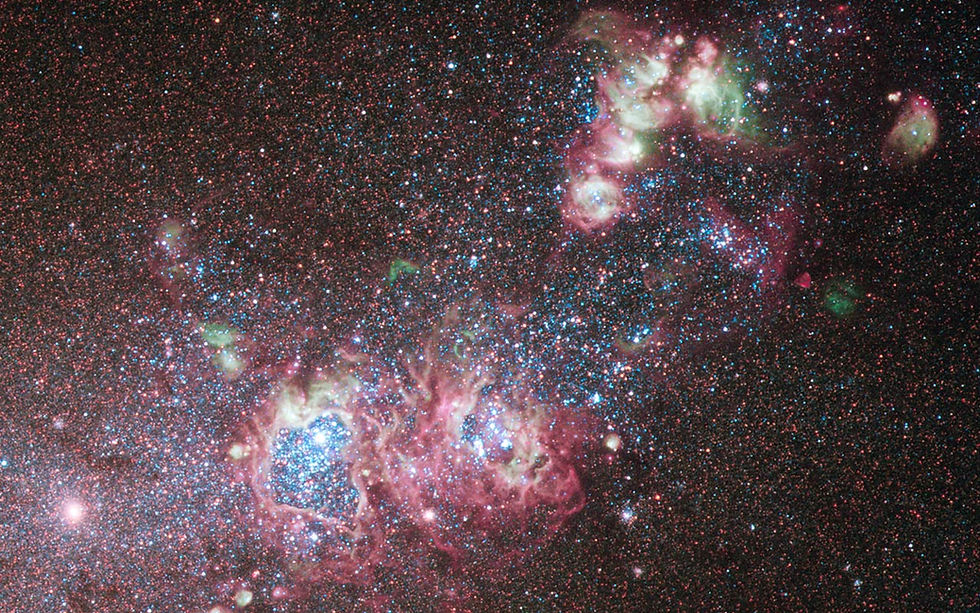

Sky Guide
Sky Guide uses augmented reality and device sensors to overlay real-time astronomical data onto the night sky, allowing users to identify and learn about any visible celestial object instantly.
Point your phone at the sky and the universe explains itself.
Sky Guide is a stargazing and astronomy app by Fifth Star Labs for iPhone, iPad, Mac, and Apple Watch. Point any device at the sky and it instantly labels every star, planet, constellation, and satellite in that direction using live AR and device sensors.
Originally launched in 2013 and now on version 12, Sky Guide is an Apple ecosystem exclusive regularly ranked among the top astronomy apps in the App Store. It works entirely offline and requires no account to use.
The app is free to download with a solid core feature set. Two optional subscription tiers — Sky Guide Plus and Sky Guide Pro — unlock deeper catalogs, more powerful zoom, and advanced tools for users who want to explore further.
Apps are frequently updated and may change over time. While we aim to keep our reviews accurate and up to date, some information may become outdated or no longer reflect the current version.
Disclaimer ▽ (click open)
How to Use
Opening Sky Guide for the first time, the app immediately requests permission to use the device’s location, compass, and camera. Once granted, it displays a real-time star map oriented to exactly where you are. Hold the phone overhead, or point it toward any part of the sky, and the app locks onto that section of the sky and labels everything visible in that field of view — stars, planets, constellations, deep sky objects, satellites, and the Moon.
Tapping any object opens a detailed information panel with astronomical data, photography, mythology context for constellations, and links to related articles. The built-in search function lets users look up any named celestial object and get an on-screen arrow that guides them toward it. For those who can’t get outside, the app can also be used pointing at walls, floors, or ceilings — the star map updates regardless of direction.
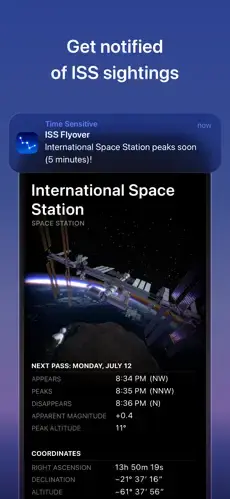
The time control feature lets users move forward or backward in time to see how the sky will look at any date or hour — useful for planning viewing sessions or understanding past astronomical events. Satellite tracking sends notifications when the International Space Station or other bright satellites are about to pass overhead. A Today view shows sunrise, sunset, moonrise, and planetary positions for the current day.
Sky Guide works entirely offline once installed, requires no account to use, and is built to run on iPhone, iPad, Mac, and Apple Watch. Red night mode preserves dark-adapted eyesight during outdoor sessions. Siri integration lets users ask aloud what a specific bright object is without opening the app.
Strongest Points:
✓ Point-and-identify AR labels any star, planet, or constellation in real time, just by holding the device toward the sky
✓ Works fully offline after installation, making it reliable for camping and remote locations without any signal
✓ Time travel mode lets users view the sky at any date in history or the future to plan events or explore astronomy
✓ Exceptional visual design with professional astrophotography, constellation art, and a full cinematic soundtrack
✓ ISS pass alerts and Siri integration add real-world utility beyond passive stargazing
Weaker Points:
✕ Apple ecosystem only — no Android version exists, so it is unavailable to a large portion of smartphone users
✕ The transition to a subscription model in 2021 frustrated longtime users who had paid for a one-time purchase
✕ Many of the deeper catalog features are locked behind Plus or Pro subscriptions, which some users find restrictive
✕ AR accuracy can degrade in areas with poor GPS signal or when compass calibration is off
✕ The free tier, while solid, limits zoom depth and satellite detail, which reduces the experience for more curious users


How to Use
Opening Sky Guide for the first time, the app immediately requests permission to use the device’s location, compass, and camera. Once granted, it displays a real-time star map oriented to exactly where you are. Hold the phone overhead, or point it toward any part of the sky, and the app locks onto that section of the sky and labels everything visible in that field of view — stars, planets, constellations, deep sky objects, satellites, and the Moon.
Tapping any object opens a detailed information panel with astronomical data, photography, mythology context for constellations, and links to related articles. The built-in search function lets users look up any named celestial object and get an on-screen arrow that guides them toward it. For those who can’t get outside, the app can also be used pointing at walls, floors, or ceilings — the star map updates regardless of direction.
The time control feature lets users move forward or backward in time to see how the sky will look at any date or hour — useful for planning viewing sessions or understanding past astronomical events. Satellite tracking sends notifications when the International Space Station or other bright satellites are about to pass overhead. A Today view shows sunrise, sunset, moonrise, and planetary positions for the current day.
Sky Guide works entirely offline once installed, requires no account to use, and is built to run on iPhone, iPad, Mac, and Apple Watch. Red night mode preserves dark-adapted eyesight during outdoor sessions. Siri integration lets users ask aloud what a specific bright object is without opening the app.
Strongest Points:
✓ Point-and-identify AR labels any star, planet, or constellation in real time, just by holding the device toward the sky
✓ Works fully offline after installation, making it reliable for camping and remote locations without any signal
✓ Time travel mode lets users view the sky at any date in history or the future to plan events or explore astronomy
✓ Exceptional visual design with professional astrophotography, constellation art, and a full cinematic soundtrack
✓ ISS pass alerts and Siri integration add real-world utility beyond passive stargazing
Weaker Points:
✕ Apple ecosystem only — no Android version exists, so it is unavailable to a large portion of smartphone users
✕ The transition to a subscription model in 2021 frustrated longtime users who had paid for a one-time purchase
✕ Many of the deeper catalog features are locked behind Plus or Pro subscriptions, which some users find restrictive
✕ AR accuracy can degrade in areas with poor GPS signal or when compass calibration is off
✕ The free tier, while solid, limits zoom depth and satellite detail, which reduces the experience for more curious users
Use it For:
⭐ Casual stargazers who want to quickly identify what’s in the sky on a clear night without any prior astronomy knowledge.
👨👧 Families and parents looking for an engaging and visually impressive way to spark children’s interest in science and space.
🌌 Outdoor enthusiasts and campers who want an offline-capable sky guide for nights away from city lights.
🔭 Amateur astronomers building their knowledge of constellations, planetary movement, and deep sky objects.
🏫 Teachers and educators looking for an interactive and visually rich tool to bring astronomy into lessons.
App Usable on:
Phone
Tablet
PC
TV
Applications and Features
Sky Guide’s core functionality is its live AR sky view, which uses the device compass, GPS, and gyroscope to map the sky in real time. Every object in the visible sky is labeled and tappable, from nearby planets to distant galaxies. The app covers stars, constellations, planets, the Moon, comets, deep sky objects, satellites, and the International Space Station — all accessible in the free tier at a usable level of detail.
The time control feature is one of its strongest tools, allowing users to fast-forward or rewind the sky to any point in history or the future. This is useful for planning meteor shower observations, understanding upcoming eclipses, or exploring how ancient cultures saw the night sky. The Today view gives a clean daily summary of planetary positions, moonrise and moonset, sunrise and sunset, and notable astronomical events.
ISS and satellite tracking with push notification alerts is built in, letting users step outside at exactly the right moment to spot a pass. Red night mode switches the interface to dim red tones to protect dark adaptation during outdoor sessions. The app also includes a library of articles, essays, and astronomical photography to provide context beyond simple identification.
Upgrading to Sky Guide Plus expands the star and object catalog, adds a dark sky finder tool, and provides advanced meteor shower forecasts. Sky Guide Pro goes further with a catalog of 1.7 billion stars, over 1 million deep-sky objects, exoplanets, extreme zoom, and cinematic guided tours of the cosmos.
▽ Gadgets Related to this App ▽
App Summary
Sky Guide is one of the most well-crafted stargazing apps on the App Store, combining genuine astronomical depth with a visual quality that makes exploring the night sky feel effortless. The AR identification feature alone is worth the download — hold the phone at the sky and everything is labeled instantly, with no setup or calibration required.
It works best for casual stargazers, families, campers, and anyone who wants an offline-capable companion for outdoor nights. The free tier covers the essentials well, and the Plus and Pro subscriptions are a reasonable step up for those who want to go deeper into the catalog.
The main limitations are that it is Apple-only and that some of its most compelling features sit behind a subscription. For iPhone and iPad users, however, Sky Guide is a difficult app to match in its category for usability, visual quality, and range of content.
Pricing:
Free
Cheap
Mid
Pricy
High
Free
Cheap
Mid
Pricy
High
Free
Cheap
Mid
Pricy
High
Free
Cheap
Mid
Pricy
High
Free
Cheap
Mid
Pricy
High
Sky Guide is free to download with a capable core feature set. Sky Guide Plus costs $2.99 per month or $19.99 per year, and Sky Guide Pro costs $4.99 per month or $39.99 per year — both include a free one-week trial. For most users the free version is sufficient, making the paid tiers genuinely optional rather than necessary.
Learning Difficulty:
Sky Guide is designed for all experience levels and requires no prior astronomy knowledge — the AR interface is self-explanatory from the first launch, with no configuration needed to start identifying objects in the sky.
Required Skill Sets:
Educational Content:
▽ Related Apps ▽

Read, organize, customize, annotate, sync, and manage digital books across multiple formats.

Access ebooks, audiobooks, documents, podcasts, and magazines through a subscription-based digital reading and listening platform.

Borrow library ebooks and audiobooks, download content offline, manage digital loans, and sync reading progress across devices.

1/4
Questions & Answers: ⮛ (click to open)
Does Sky Guide work without an internet connection?
Yes. Sky Guide is fully functional offline once downloaded and installed. All core star map data, constellation information, and AR features are stored on the device, making it a reliable companion for camping trips or remote locations without cell service.
Is Sky Guide available on Android?
No. Sky Guide is an Apple ecosystem exclusive, available on iPhone, iPad, Mac, Apple Watch, and Apple Vision Pro. There is currently no Android version. Android users looking for a comparable app should consider alternatives such as Star Walk or Stellarium.
What is the difference between Sky Guide Plus and Sky Guide Pro?
Sky Guide Plus expands the star and object catalog, adds a dark sky finder, and provides enhanced meteor shower forecasts. Sky Guide Pro includes everything in Plus, with a 1.7-billion-star catalog, over 1 million deep-sky objects, exoplanet data, extreme zoom levels, and exclusive cinematic guided tours. Both tiers include a one-week free trial.
Do I need to create an account to use Sky Guide?
No account is required to use Sky Guide. The app simply requests access to the device’s location and compass to orient the star map. Subscriptions are managed through the Apple App Store without any separate account registration.
Good to Knows: ⮛ (click to open)
• Sky Guide works completely offline after installation, meaning it is fully usable in remote areas, on camping trips, or anywhere with no phone signal.
• Users who purchased the original paid version of Sky Guide before August 2021 retain all the features they paid for under a legacy access model.
• The app is available not just on iPhone and iPad, but also on Mac, Apple Watch, and Apple Vision Pro, making it one of the most cross-device astronomy tools in the Apple ecosystem.
Takeaways: ⮛ (click to open)
• Sky Guide is the visual and usability benchmark for stargazing apps on Apple devices, with an AR experience that works immediately for any level of user.
• The free tier handles casual use well, and the Plus and Pro subscriptions are fairly priced for those who want a deeper astronomy experience.
• Apple-only availability is a genuine limitation, but for iPhone and iPad users it remains one of the strongest apps in its category.
Did You Get Any of That?
Related Science Articles:
Explore Other App Solutions With our Blogs
Discover how different apps approach common challenges, what they do well, and where they fall short — helping you understand which tools are best suited for your specific goals and daily routines.
5 Skincare Apps, One Question: Will You Still Be Using It in 30 Days?
Five skincare apps compared on ingredient safety, routine building, and skin progress tracking — find out which one fits how you actually use skincare.

Gadgifyr Apps
July 23, 2026
-
9 min

Read More, Forget Less: 5 Apps Built for Retention, Not Just Bookmarks
Kindle, Audible, Libby, Scribd, and Moon+ Reader compared — find out which one fits your reading habits and helps the content stick.
Gadgifyr Apps
July 8, 2026
-
9 min

Best Focus and Productivity Apps Compared
Forest, TickTick, Todoist, Trello, and Notion compared — find out which one builds real focus habits rather than adding another tool to ignore.
Gadgifyr Apps
July 5, 2026
-
9 min

Cutting Through the Noise: 5 Market Sources Worth Your Actual Attention
Bloomberg, Seeking Alpha, Investing.com, Yahoo Finance, and Finimize — compared on what they actually deliver to different types of investors.
Gadgifyr Apps
July 2, 2026
-
9 min




Where Curiosity Finds Its Match
Dive into Gadgifyr’s world of honest gadget reviews, scientific clarity, app reviews, and real tools designed to make everyday life smarter and simpler.
Clarity Behind Every Tool
Gadgifyr reviews apps and gadgets through structured analysis and science-backed insight. It focuses on how tools actually work, where they deliver real value, and how they fit into everyday routines.
Each review highlights functionality, usability, and limitations in a clear and practical way. This approach helps users understand which tools are worth using and make informed decisions with confidence.


Why People Trust Gadgifyr App Reviews
Because we go beyond popularity — we uncover new apps, explain how they work, and show what truly adds value. From hidden tools to well-known platforms, we help you understand what fits your needs.


